Configure custom Artificial Intelligence servers
SquashTM provides a mechanism, called the custom AI servers, to configure and use any LLM API.
The configuration requires some technical knowledge
It is required to know and understand the details of the HTTP request headers, JSON request, and JSON answer to be able to configure a custom AI server.
These technical details are described in the documentation provided by the company hosting the API.
Parameters
A custom AI server has the same parameters as other AI servers (Name, API provider, URL, and Description) except for Model which is not applicable.
The URL must be the URL of the API endpoint that manages chat completion.
You must define
- the payload template which will be used to generate the JSON request sent to the API endpoint;
- the JSON path of generated text which will be used to extract the answer generated by the AI.
It is possible to configure up to five HTTP headers, each defined by its name and a template used to compute its value.
The HTTP header Content-Type: application/json should not be defined as SquashTM will add it automatically.
You can define a request Timeout as for the other AI servers. The default timeout value is 120 seconds.
The following two optional parameters allow you to capture the number of tokens consumed for input (the prompt sent to the LLM) and output (the generated response):
- JSON path of input token count
- JSON path of output token count
Each JSON path points to the location of the corresponding value in the LLM API response. These values feed into the AI generation statistics in SquashTM, available in the Statistics tab of the Administration workspace. If these parameters are left empty, token usage statistics are not collected.
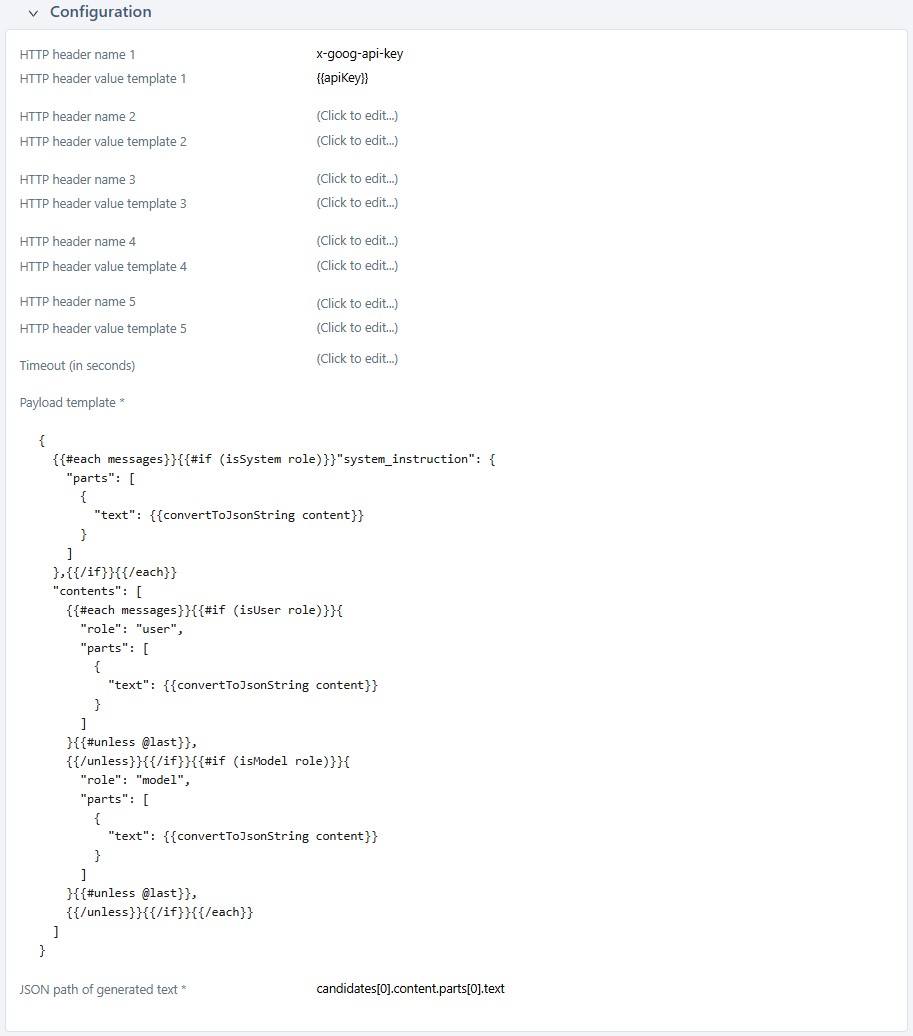
Write templates
The payload template and the header value templates are evaluated using Handlebars.
The following variables are available:
messages: the list of messages.
Each message has aroleand acontent.
The value ofroleshould not be used directly; the helpersisSystem,isUser, andisModel(see below) should be used instead.apiKey: the value of the API key.
The following helpers (methods) are available:
isSystem(takes as input a string containing a role, returns a boolean): tests whether this is a system message (a.k.a a system prompt);isUser(takes as input a string containing a role, returns a boolean): tests whether this is a user message (a.k.a a user prompt);isModel(takes as input a string containing a role, returns a boolean): tests whether this is a message from the AI;convertToJsonString(takes as input a string, returns a string): converts a string to a JSON string (including the beginning and ending double quotes) by escaping the special characters.
We detail here two examples of templates and the results of their applications.
Example 1: OpenAI
The JSON request payload, the HTTP headers, and the JSON answer payload are described here.
(Please, keep in mind that this is provided here as an example of template usage. If you consider using OpenAI models, you should simply configure such a model.)
Configuration
- payload template:
{ "model": "gpt-4.1", "messages": [ {{#each messages}}{ "role": "{{#if (isSystem role)}}system{{/if}}{{#if (isUser role)}}user{{/if}}{{#if (isModel role)}}assistant{{/if}}", "content": {{convertToJsonString content}} }{{#unless @last}}, {{/unless}}{{/each}} ], "temperature": 0.7, "seed": 42 } - HTTP header name 1:
Authorization - HTTP header value template 1:
Bearer {{apiKey}} - JSON path of generated text:
choices[0].message.content - JSON path of input token count (optional):
usage.prompt_tokens - JSON path of output token count (optional):
usage.completion_tokens
Application
Assuming these messages:
| role | content |
|---|---|
| system | You are a QA assistant that helps with test planning. |
| user | I need to create an exploratory test chart for our checkout flow. Where should I start? |
| model | Start by identifying the main test areas: user flows, payment methods, error handling, and security. Focus on the "happy path" first, then edge cases. What's the most critical part of your checkout process? |
| user | Payment validation is crucial. We've had issues with users getting stuck on the "processing" screen before. |
| model | That's a key area to explore. For payment validation, test scenarios like network timeouts, declined cards, and session expiry. Document what happens when users refresh during processing or navigate away mid-transaction. |
| user | Should I create different user personas for my exploratory testing, like new users versus returning customers? |
and this API key: sec_DEADBEEF.
SquashTM will generate this JSON payload:
{
  "model": "gpt-4.1",
  "messages": [
    {
      "role": "system",
      "content": "You are a QA assistant that helps with test planning."
    },
    {
      "role": "user",
      "content": "I need to create an exploratory test chart for our checkout flow. Where should I start?"
    },
    {
      "role": "assistant",
      "content": "Start by identifying the main test areas: user flows, payment methods, error handling, and security. Focus on the \"happy path\" first, then edge cases. What's the most critical part of your checkout process?"
    },
    {
      "role": "user",
      "content": "Payment validation is crucial. We've had issues with users getting stuck on the \"processing\" screen before."
    },
    {
      "role": "assistant",
      "content": "That's a key area to explore. For payment validation, test scenarios like network timeouts, declined cards, and session expiry. Document what happens when users refresh during processing or navigate away mid-transaction."
    },
    {
      "role": "user",
      "content": "Should I create different user personas for my exploratory testing, like new users versus returning customers?"
    }
  ],
  "temperature": 0.7,
  "seed": 42
}
Authorization: Bearer sec_DEADBEEF
Content-Type: application/json
Example 2: Gemini for developers
The JSON request payload, the HTTP headers, and the JSON answer payload are described here.
(Please, keep in mind that this is provided here as an example of template usage. If you consider using Gemini models, you should use Vertex AI rather than the developer Gemini API and simply configure such a model.)
Configuration
- payload template:
{ {{#each messages}}{{#if (isSystem role)}}"system_instruction": { {{! system prompt }} "parts": [ { "text": {{convertToJsonString content}} } ] },{{/if}}{{/each}} "contents": [ {{#each messages}}{{#if (isUser role)}}{ {{! user inputs (prompts) }} "role": "user", "parts": [ { "text": {{convertToJsonString content}} } ] }{{#unless @last}}, {{/unless}}{{/if}}{{#if (isModel role)}}{ {{! model's answers }} "role": "model", "parts": [ { "text": {{convertToJsonString content}} } ] }{{#unless @last}}, {{/unless}}{{/if}}{{/each}} ], "generationConfig": { "stopSequences": [ "Title" ], "temperature": 1.0, "topP": 0.8, "topK": 10 } } - HTTP header name 1:
x-goog-api-key - HTTP header value template 1:
{{apiKey}} - JSON path of generated text:
candidates[0].content.parts[0].text - JSON path of input token count (optional):
usage_metadata.prompt_token_count - JSON path of output token count (optional):
usage_metadata.candidates_token_count
Application
Assuming these messages:
| role | content |
|---|---|
| system | You are a QA assistant that helps with test planning. |
| user | I need to create an exploratory test chart for our checkout flow. Where should I start? |
| model | Start by identifying the main test areas: user flows, payment methods, error handling, and security. Focus on the "happy path" first, then edge cases. What's the most critical part of your checkout process? |
| user | Payment validation is crucial. We've had issues with users getting stuck on the "processing" screen before. |
| model | That's a key area to explore. For payment validation, test scenarios like network timeouts, declined cards, and session expiry. Document what happens when users refresh during processing or navigate away mid-transaction. |
| user | Should I create different user personas for my exploratory testing, like new users versus returning customers? |
and this API key: sec_DEADBEEF.
SquashTM will generate this JSON payload:
{
  "system_instruction": {
    "parts": [
      {
        "text": "You are a QA assistant that helps with test planning."
      }
    ]
  },
  "contents": [
    {
      "role": "user",
      "parts": [
        {
          "text": "I need to create an exploratory test chart for our checkout flow. Where should I start?"
        }
      ]
    },
    {
      "role": "model",
      "parts": [
        {
          "text": "Start by identifying the main test areas: user flows, payment methods, error handling, and security. Focus on the \"happy path\" first, then edge cases. What's the most critical part of your checkout process?"
        }
      ]
    },
    {
      "role": "user",
      "parts": [
        {
          "text": "Payment validation is crucial. We've had issues with users getting stuck on the \"processing\" screen before."
        }
      ]
    },
    {
      "role": "model",
      "parts": [
        {
          "text": "That's a key area to explore. For payment validation, test scenarios like network timeouts, declined cards, and session expiry. Document what happens when users refresh during processing or navigate away mid-transaction."
        }
      ]
    },
    {
      "role": "user",
      "parts": [
        {
          "text": "Should I create different user personas for my exploratory testing, like new users versus returning customers?"
        }
      ]
    }
  ],
  "generationConfig": {
    "stopSequences": [
      "Title"
    ],
    "temperature": 1.0,
    "topP": 0.8,
    "topK": 10
  }
}
x-goog-api-key: sec_DEADBEEF
Content-Type: application/json
Validate the payload template
Writing a JSON template is difficult. In order to help with configuring it, before trying to send a message to the API endpoint, it is strongly advised to validate the generation of the payload.
This validation consists in generating the payload of a discussion including a system prompt, and a sequence user prompt / model answer / user prompt / model answer / user prompt. A dummy API key is also provided in case this one needs to be included in the request payload. (Some values are provided by default for all these fields, they should be adequate for the test, but you can modify them.)
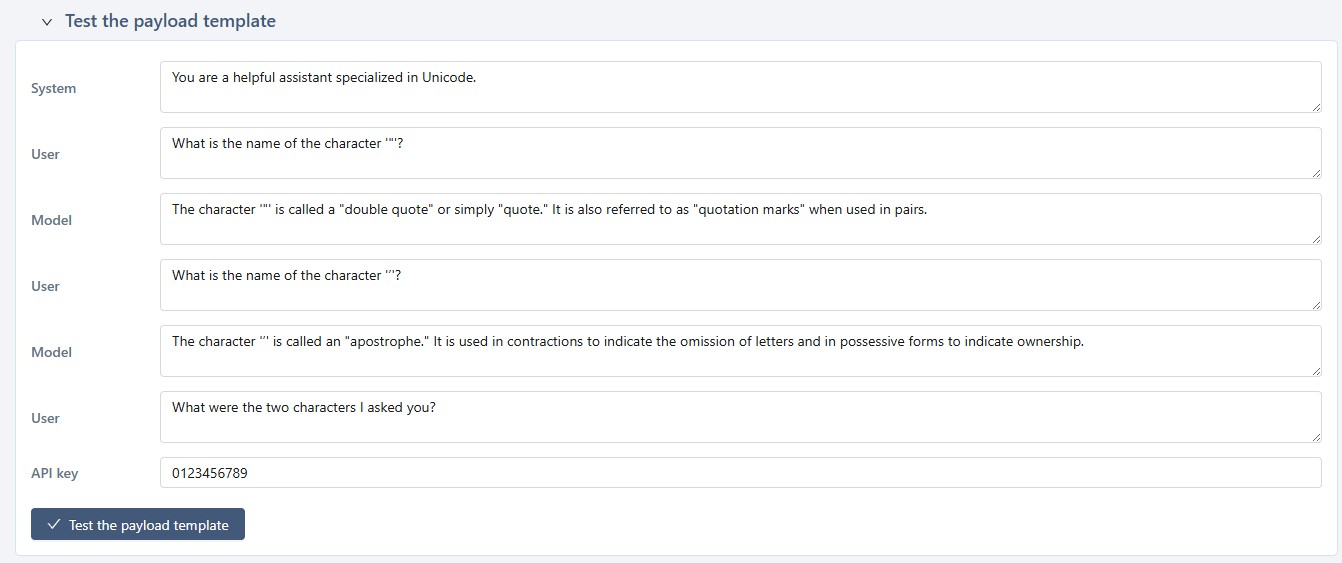
When clicking the [Test the payload] button, SquashTM will:
- process the template with Handlebars
- validate that the resulting text is proper JSON
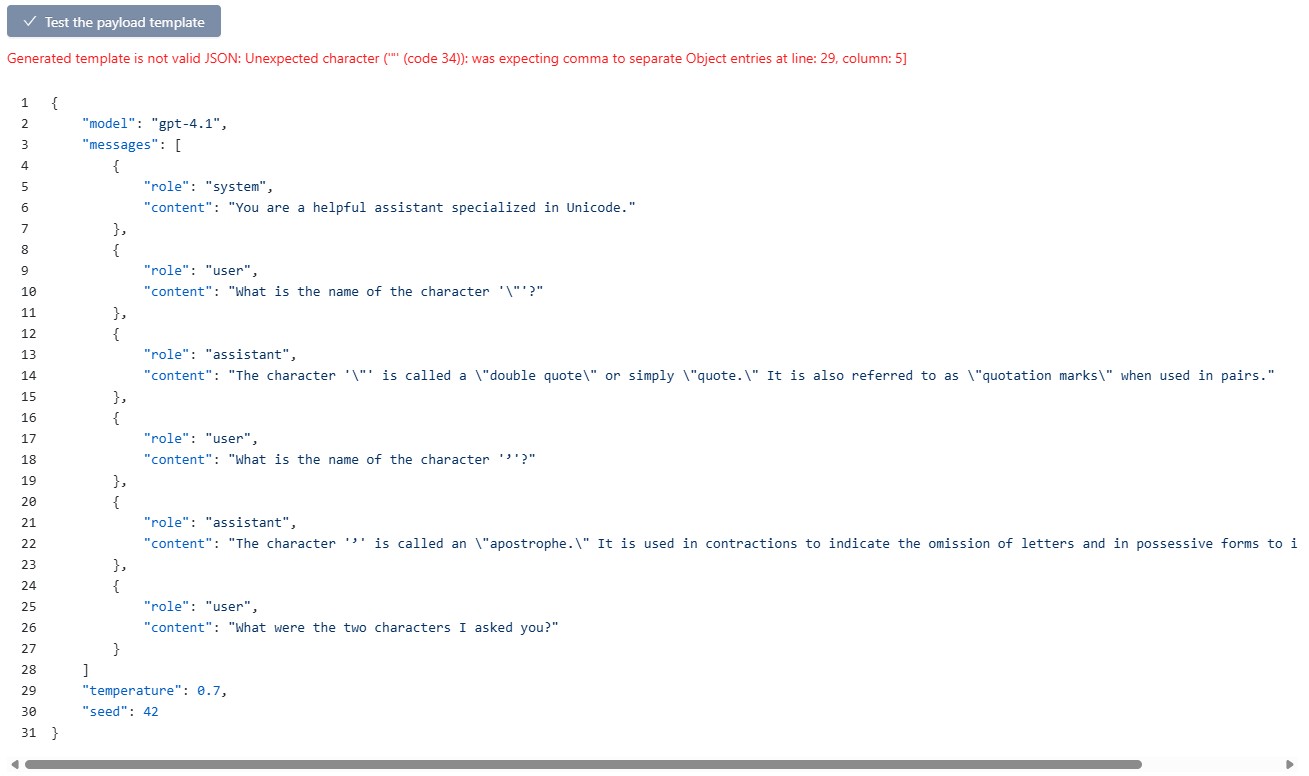
If any error is detected during one of these two steps, an error message is displayed.
Example of an invalid Handlebar syntax (here
{{/each}}has been mistyped as{{/Each}}):
Example of an invalid JSON (here a comma is missing):
If no error is detected, the generated JSON is displayed. You should carefully check that it corresponds to what is expected by the API endpoint.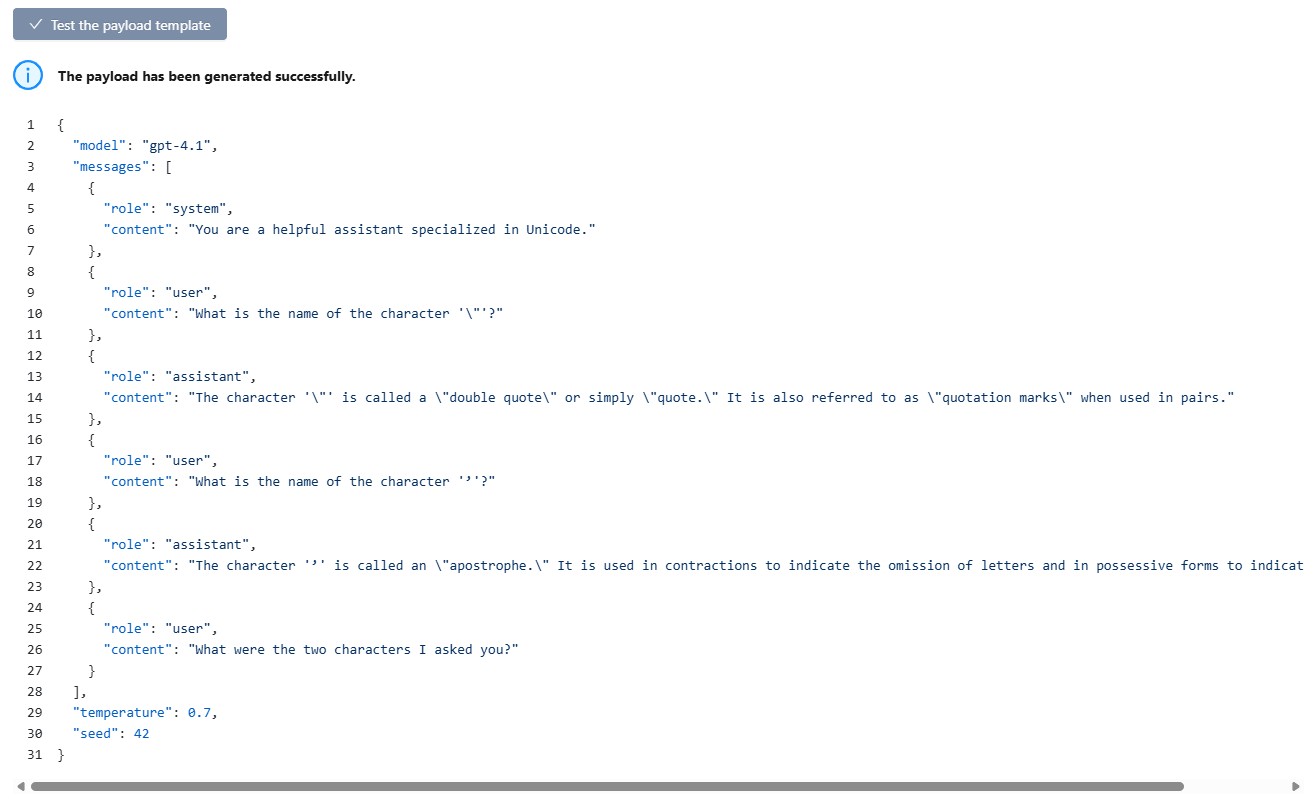
Tip: use AI to debug the template prompt
SquashTM tries to provide an error message as informative as possible to help you to understand a template error.
Nevertheless, some syntax errors may be difficult to understand in some cases.
In such a situation, do not hesitate to ask help to one of the well-known AI chats, it will probably provide some helpful tips.
Example with Claude: 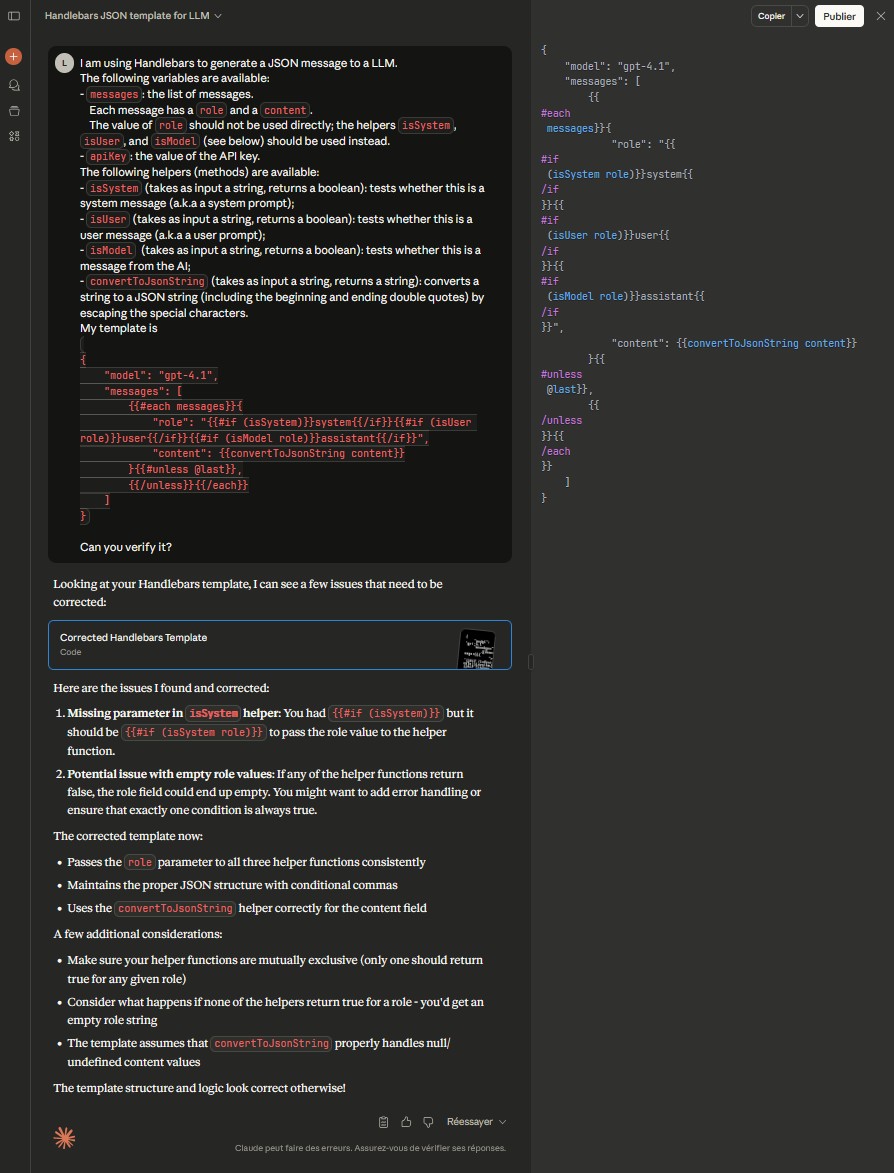
Define the JSON path of the generated text
The JSON path defines where the AI-generated text is in the response payload.
For example, an OpenAI response has the following structure (using the same example as above):
{
  "id": "chatcmpl-ByhUZb4oqcLYnSm2fz19BRXDs2jwp",
  "object": "chat.completion",
  "created": 1753806563,
  "model": "gpt-4.1-2025-04-14",
  "choices": [
    {
      "message": {
        "role": "assistant",
        "content": "Absolutely! Creating user personas adds depth and realism to your exploratory testing. Different personas can uncover unique issues and flows. Here's how to approach it:\n\n**1. Identify Key Personas:**  \n- **New Users:** First-time buyers, possibly without accounts.  \n- **Returning Customers:** Logged-in users with saved information.  \n- **Guest Checkout Users:** Users who don't want to create an account.  \n- **International Users:** Different languages, currencies, or addresses.  \n- **Users with Accessibility Needs:** Relying on screen readers or keyboard navigation.\n\n**2. Vary Scenarios:**  \nTest how each persona interacts with the checkout flow—what information they're prompted for, what errors they might encounter, and how payment validation responds.\n\n**3. Focus Areas:**  \n- Account creation or login steps  \n- Saved addresses or payment methods  \n- Autofill and validation errors  \n- Session timeouts for slow or distracted users  \n- Handling of incomplete or incorrect payment info\n\n**4. Document Findings:**  \nNote any friction points unique to each persona.\n\n**Summary:**  \nUsing personas helps ensure your checkout flow works smoothly for all types of real-world users and makes your exploratory testing more comprehensive.",
        "refusal": null,
        "annotations": []
      },
      "logprobs": null,
      "finish_reason": "stop"
    }
  ],
  "usage": {
    "prompt_tokens": 177,
    "completion_tokens": 242,
    "total_tokens": 419,
    "prompt_tokens_details": {
      "cached_tokens": 0,
      "audio_tokens": 0
    },
    "completion_tokens_details": {
      "reasoning_tokens": 0,
      "audio_tokens": 0,
      "accepted_prediction_tokens": 0,
      "rejected_prediction_tokens": 0
    }
  },
  "service_tier": "default",
  "system_fingerprint": "fp_51e1070cf2"
}
choices[0].message.content.Document context limits
Not applicable to custom AI servers
Adding context documents during test case generation is currently not available for custom AI servers. The panel is displayed for informational purposes only and its settings are not taken into account.
Images not supported
Custom AI servers do not support images. All images contained in the requirements and test cases added to the context are ignored during generation.
Test the configuration
Once you have finished the configuration, you should test it as for any AI server.