Publish to SquashTM
Now that you have parsed test results in SquashTM's JSON format, the final step is to publish these results to your SquashTM instance.
What you'll learn in this section:
- Configure API token authentication
- Send the
result.jsonfile to SquashTM's API - Verify that results appear in SquashTM
In this example, we'll update the parser script to also publish results to SquashTM via the API.
See the Complete Script
You can view the complete script with publishing functionality here: parse_robot_results.py.
Example: GitLab CI/CD + Robot Framework
Step 1: Configure SquashTM URL and authentication
You need to provide your SquashTM credentials to the pipeline so it can publish results.
If you followed the Prepare SquashTM section, you should already have an API token. Now you'll configure these credentials as GitLab CI/CD variables.
Go to your GitLab project → Settings → CI/CD → Variables and add the following variables:
| Variable Name | Value | Masked | Hidden |
|---|---|---|---|
SQUASH_TM_URL | https://your-squash-instance.com | ✓ | ✗ |
SQUASH_TM_API_TOKEN | Your API token from SquashTM | ✓ | ✓ |
SQUASH_TM_ITERATION_ID | The iteration ID in SquashTM | ✗ | ✗ |
Finding the Iteration ID
You can find this ID from the iteration you created in the Prerequisites guide:
- From the web interface: See Step 3 (Web Interface). The iteration ID is visible in the URL when you open the iteration in SquashTM, or in the iteration's "Information" menu.
- From the API: See Step 3 (API). The iteration ID is returned in the API response body.
Step 2: Update the parser script to publish results
Update your ci/parse_robot_results.py script to add the publishing functionality.
First, add the missing imports at the top of the file:
import os
import sys
from urllib.request import Request, urlopen
from urllib.error import HTTPError, URLError
Add these environment variables and functions to your script:
SQUASH_TM_URL = os.getenv('SQUASH_TM_URL')
SQUASH_TM_API_TOKEN = os.getenv('SQUASH_TM_API_TOKEN')
SQUASH_TM_ITERATION_ID = os.getenv('SQUASH_TM_ITERATION_ID')

SQUASH_TM_API_IMPORT_ENDPOINT = "api/rest/latest/import/results"

def check_tm_variables():
    if not SQUASH_TM_URL:
        print("""
SQUASH_TM_URL is not set.
Please set your SquashTM public URL, for example:
SQUASH_TM_URL=https://squash.example.com/
""")
        sys.exit(1)

    if not SQUASH_TM_ITERATION_ID:
        print("""
SQUASH_TM_ITERATION_ID is not set.
Please set the SQUASH_TM_ITERATION_ID environment variable, for example:
SQUASH_TM_ITERATION_ID=345
""")
        sys.exit(1)

    if not SQUASH_TM_API_TOKEN:
        print("""
No authentication configured for SquashTM.
Please set the SQUASH_TM_API_TOKEN environment variable, for example:
SQUASH_TM_API_TOKEN=<your_token>
""")
        sys.exit(1)

def upload_to_squash_tm(report):
    """Upload test results to SquashTM via POST request."""

    # Normalize base URL and endpoint to avoid missing/extra slashes
    base = SQUASH_TM_URL.strip('/')
    endpoint = SQUASH_TM_API_IMPORT_ENDPOINT.strip('/')
    iteration_id = str(SQUASH_TM_ITERATION_ID).strip('/')
    url = f"{base}/{endpoint}/{iteration_id}"

    try:
        json_data = json.dumps(report).encode('utf-8')
        auth_header = f"Bearer {SQUASH_TM_API_TOKEN}"

        request = Request(url, data=json_data, method='POST')
        request.add_header('Content-Type', 'application/json')
        request.add_header('Authorization', auth_header)

        with urlopen(request) as response:
            status = getattr(response, 'status', None)
            if status == 204:
                print(f"Results uploaded to SquashTM using Token auth (status: 204 No Content)")
                return
            else:
                body = response.read().decode('utf-8', errors='replace')
                print(f"Unexpected SquashTM response status: {status}")
                if body:
                    print("Response body (truncated to 2000 chars):")
                    print(body[:2000])
                sys.exit(1)

    except HTTPError as e:
        print(f"HTTP error uploading to SquashTM: {e.code} - {e.reason}")
        sys.exit(1)
    except URLError as e:
        print(f"Connection error uploading to SquashTM: {e.reason}")
        sys.exit(1)
    except Exception as e:
        print(f"Unexpected error uploading to SquashTM: {e}")
        sys.exit(1)
What the code above enforces and guarantees:
check_tm_variables():- Requires
SQUASH_TM_URLto target your SquashTM instance - Requires
SQUASH_TM_ITERATION_IDto build the results import API URL - Requires
SQUASH_TM_API_TOKENfor authentication - Fails fast with clear guidance (exit code 1) if something is missing
- Requires
upload_to_squash_tm(report):- Builds the
Authorizationheader with the token authentification - Treats HTTP 204 No Content as success; any other status logs details and exits with code 1
- Builds the
Update the main() function:
def main():
    """Main function."""
    check_tm_variables()

    tests = parse_tests('xunit.xml')

    attachments = create_attachments()

    report = {
        'automated_test_suite': {
            'attachments': attachments
        },
        'tests': tests
    }

    with open('result.json', 'w', encoding='utf-8') as f:
        json.dump(report, f, indent=2, ensure_ascii=False)

    print(f"{len(tests)} test(s) parsed")
    print(f"result.json created with {len(attachments)} attachment(s)")

    upload_to_squash_tm(report)
What these additions do:
check_tm_variables(): Verifies that required environment variables are set before attempting uploadupload_to_squash_tm(): Sends the JSON report to SquashTM's API using API token authentication- Updated
main(): Now callsupload_to_squash_tm()to publish results after parsing - Error handling: Exits with error code if upload fails
Step 3: Verify the pipeline job
The parse-and-publish job you created earlier already has everything it needs.
The script will automatically publish results if the environment variables are set.
What happens:
- The script parses test results from
xunit.xml - Creates attachments from test report files
- Saves everything to
result.json - Attempts to upload to SquashTM using the configured credentials
- Fails the job if upload fails (due to
allow_failure: false)
Commit your updated parser script:
git add ci/parse_robot_results.py
git commit -m "Add SquashTM publishing to parser"
git push
Verify the publication
- Go to your GitLab project
- Navigate to Build → Pipelines
- Click on the latest pipeline
- Click on the
parse-and-publishjob - Check the logs for the success message:
Results uploaded to SquashTM using Token auth (status: 204 No Content)
Step 4: Verify in SquashTM
- Log in to SquashTM
- Navigate to your project
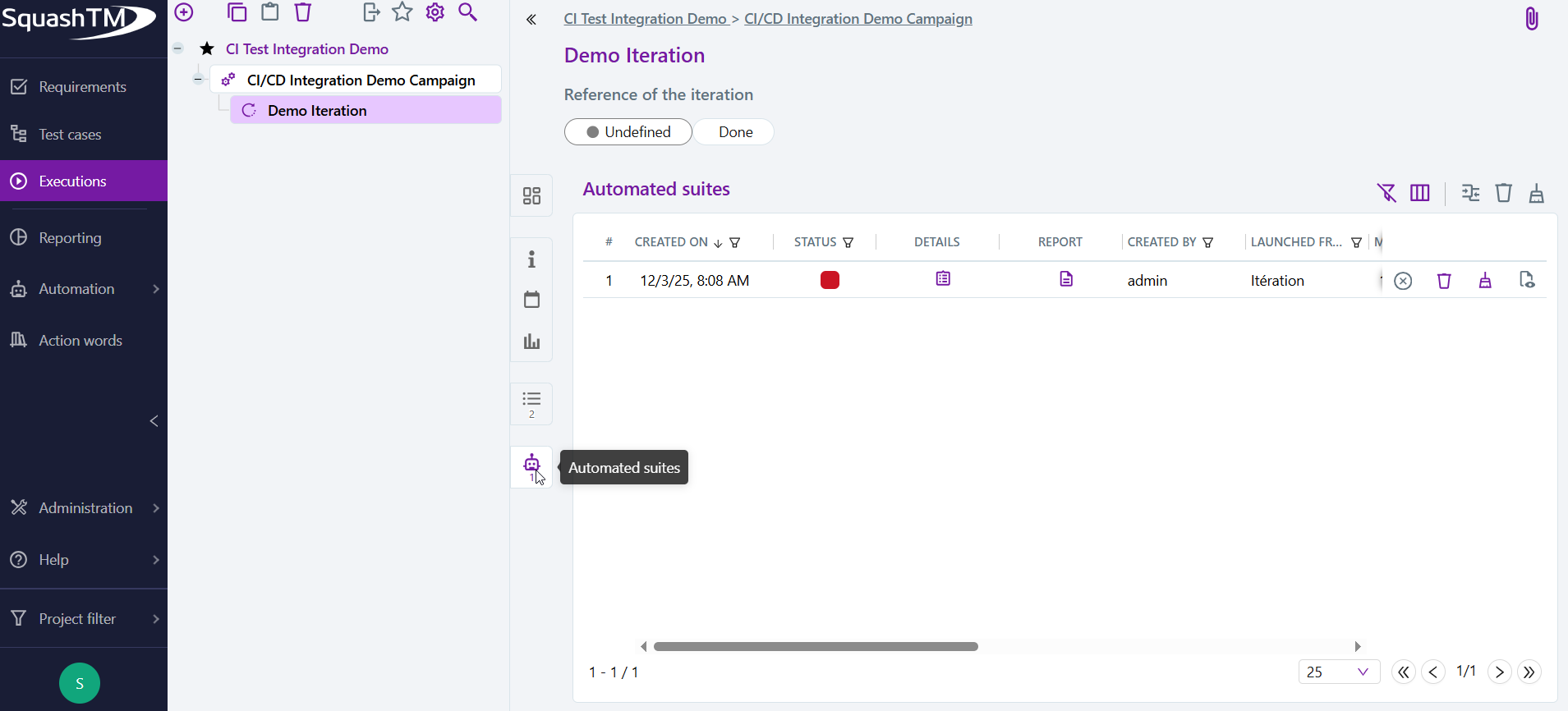
- Go to Executions → Project → Campaign → Iteration → Automated Suites
- You should see a new automated suite with your test results
For more details on analyzing automated test results in SquashTM, see Analyze CI/CD Results.
What you've accomplished
Your complete CI/CD integration is now working:
- Tests run automatically in your pipeline
- Results are parsed into SquashTM's JSON format
- Results are published to SquashTM via the API
- Test reports are attached for easy debugging
- Everything is automated on every commit
Congratulations! You now have a fully automated CI/CD integration with SquashTM.
Bonus: Troubleshooting
If you encounter any issues during integration, check the Troubleshooting page for solutions to common problems.