Automation with Postman
Postman support is available starting with Squash TM 3.0.
Configuration of the execution environment
newman and its HTML Reporter (newman-reporter-html) must be present in the execution environment.
They can be installed with the commands:
npm install -g newman
npm install -g newman-reporter-html
Test reference in SquashTM
In order to bind a SquashTM test case to a Postman automated test, the content of the Automated test reference field of the Automation block of a test case must have the following format:
[repository]/[collection]#[folder]#[request]
or[repository]/[collection]#[folder]
or[repository]/[collection]
(The reference contains zero, one, or two # characters.)
with:
[repository]: Name of the Git repository.[collection]: Path and name of the Postman collection file, from the root of the project (with the.postman_collection.jsonextension).No support of renamed collection files
SquashTM Orchestrator uses the name of the file to determine the name of the collection, i.e. if the file is called
<name>.postman_collection.json, then the collection name is considered to be<name>. SquashTM Orchestrator uses this name<name>to analyze the execution report and determine the test result.
If the collection file has been renamed, this mechanism will no longer work.[folder]: Name of a specific folder containing requests in the Postman collection file (Newman's--folderoption).
This parameter is optional, i.e. the last two components of the test reference may be absent.
It is also possible to use an empty string and to indicate a specific request (in[request]).[request]: Name of a specific request to parse for which you want to obtain a particular result.
This parameter is optional, i.e. it may be absent.
Automated test reference and execution
The request [request] precision in the test reference has no impact on the execution, but only on test result determination.
So, even when defining the specific level of the request, all requests defined in the folder (if [folder] is defined) or in the collection (if [folder] is empty) will be executed; this means, for example, that if several SquashTM test cases point toward the same folder / collection but toward different requests, then all requests of the folder / collection will be executed several times.
The test reports include the traces of all executed requests. But, only the Error / Failed / Success status corresponding to the specific request is used to determinate the test case result.
Determination of the result of the test case
If a request [request] is not specified, the result of the SquashTM test case is calculated by taking into account the individual results of each Postman request included in the folder [folder] if it is specified, in the whole collection [collection] otherwise:
- If at least one test has an Error status (in case of a technical issue), the status of the execution will be Blocked.
- If at least one test fails functionally and none of the other ones has an Error status, the status of the execution will be Failed.
- If all tests succeed, the status of the execution will be Success.
Unicity of the specified folder
If the root directory of the project contains multiple directories with the name [folder], Newman will only run the first one it finds. It is therefore strongly advised to choose unique names for the lowest level directories.
Nature of the exploitable SquashTM parameters
The exploitable SquashTM parameters will differ depending on whether you're using the Community/Premium or Ultimate version of SquashTM.
Here is a table showing the exploitable parameters (these parameters are transmitted as test parameters, see below, SquashTM does not generate global parameters):
| Nature | Key | Community/Premium | Ultimate |
|---|---|---|---|
| Name of the dataset | DSNAME | ✅ | ✅ |
| Dataset parameter | DS_[name] | ✅ | ✅ |
| Execution ID | TC_EXECUTION_ID | ❌ | ✅ |
| Test case reference | TC_REFERENCE | ✅ | ✅ |
| Test case internal UUID | TC_UUID | ✅ | ✅ |
| Test case custom field | TC_CUF_[code] | ✅ | ✅ |
| Iteration custom field | IT_CUF_[code] | ❌ | ✅ |
| Campaign custom field | CPG_CUF_[code] | ❌ | ✅ |
| Test suite custom field | TS_CUF_[code] | ❌ | ✅ |
Legend:
[code]: Value of the "Code" of a custom field[name]: Name of a dataset
As indicated, SquashTM adds a prefix to the code of the transmitted custom field. Make sure to take it into account.
Availability of the execution ID
TC_EXECUTION_ID is only available with Squash TM 8.0 or later.
Parameters usage
It is possible, when running Postman tests, to exploit parameters within it. A parameter can be a test parameter or a global parameter. SquashTM transmits only test parameters. Test parameters and global parameters can be used in the case of a launch from a CI/CD pipeline with the postman/params action.
The global parameters are transmitted as global variables.
The test parameters are transmitted as environment variables.
Refer to the Postman documentation for a description of these variable types and how to use them.
This means that
- the value of a global parameter can be retrieved using
pm.globals.get("param_name") - the value of a test parameter can be retrieved using
pm.environment.get("param_name") - the value of a global parameter or of a test parameter can be retrieved with the
{{param_name}}syntax; if a global parameter and a test parameter have both theparam_namename, the value of the test parameter is used
Example
Below is an example of a Postman collection file and the corresponding SquashTM test case automation:
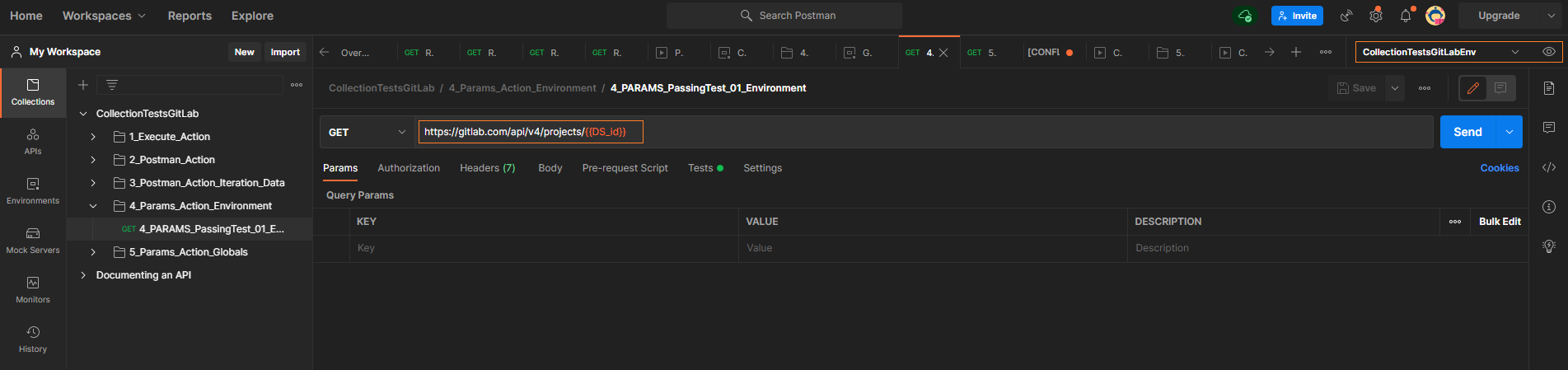
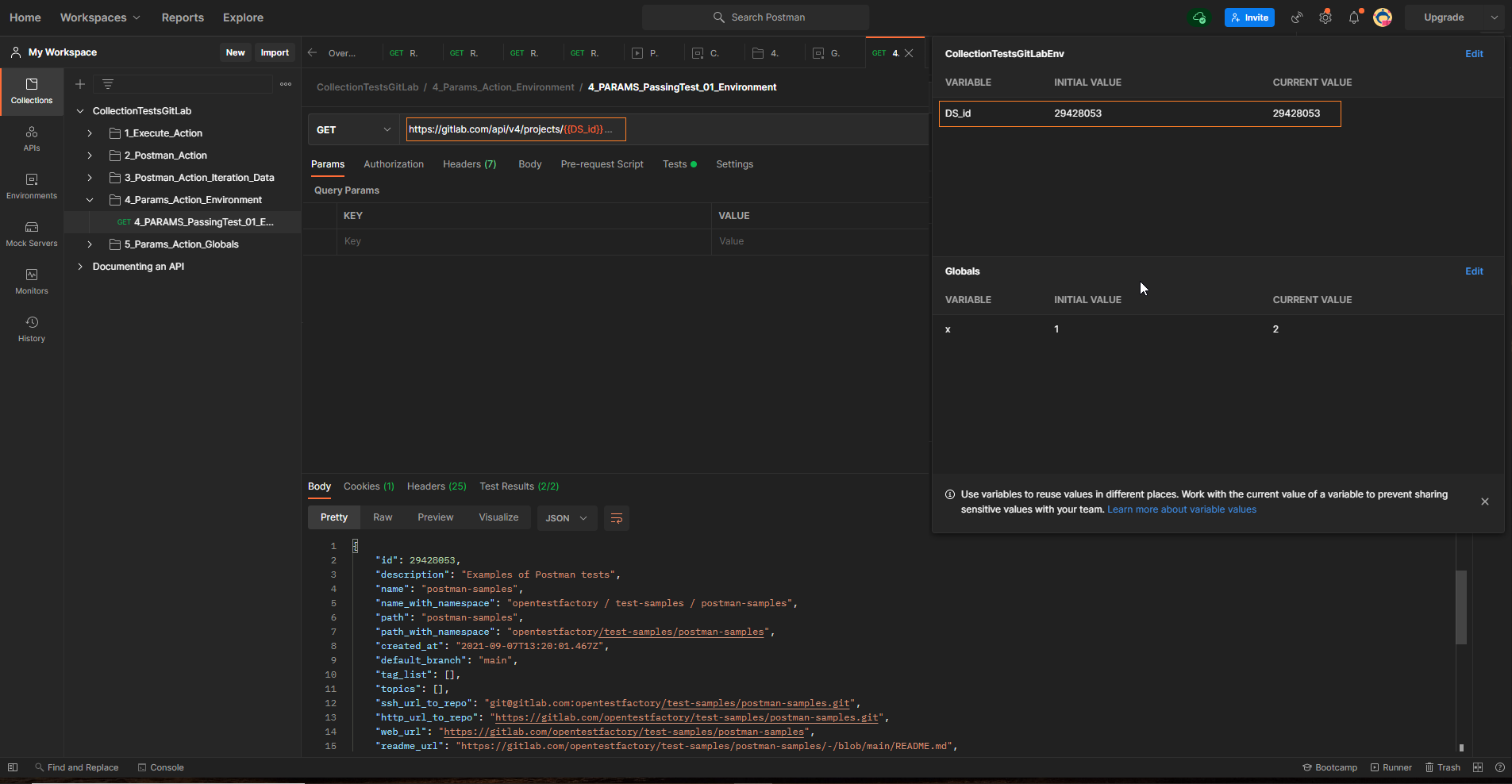
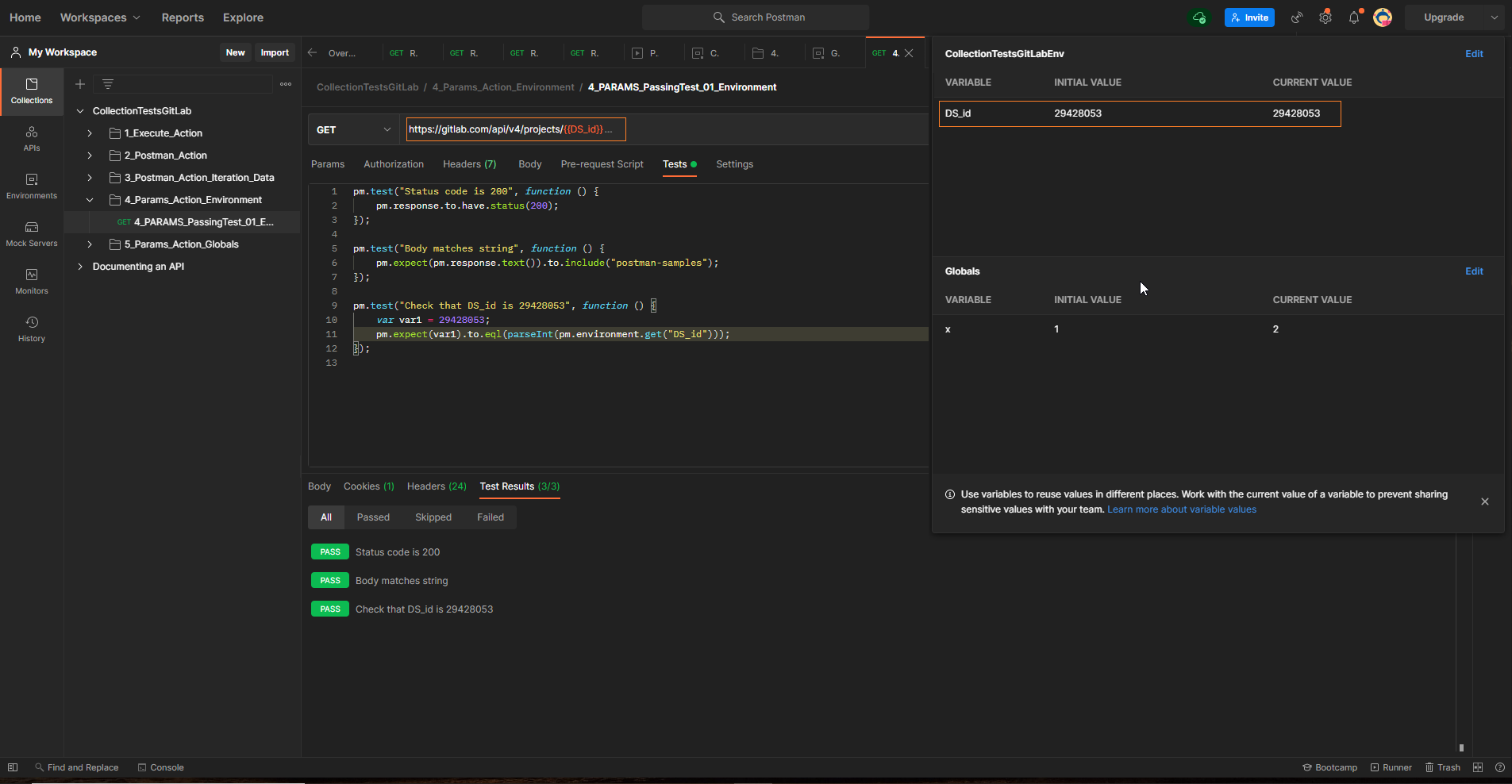
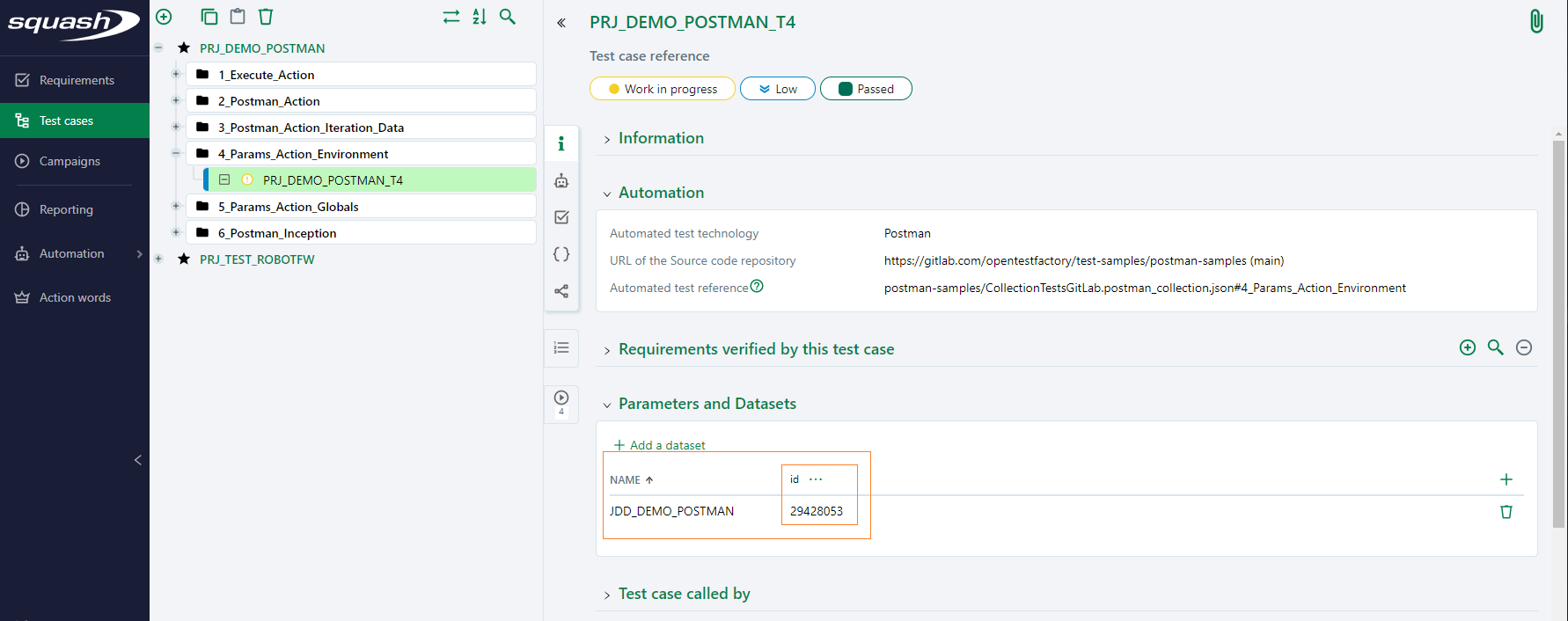
Adding parameters to the test launch command line
You can pass additional parameters to the newman run command using the POSTMAN_EXTRA_OPTIONS environment variable. Here is an example of how to define an environment variable in SquashTM and associate it with the orchestrator.
Some parameters are already defined in the newman run command used to launch tests:
newman run \
  "{collection_path}"  \
  -g _opentf_global_params.json -e _opentf_environment_params.json \
  --reporters junit,html \
  --reporter-junit-export newman-run-report.xml \
  --reporter-html-export newman-run-report.html $POSTMAN_EXTRA_OPTIONS
You must avoid passing, via the POSTMAN_EXTRA_OPTIONS variable, the command line parameters that conflict with the parameters already used, or the parameters that impact the generation or alter the path of the reports expected by the orchestrator (view the report list).
Non-support of the space character on Linux
SquashTM Orchestrator currently does not support the space character () in the POSTMAN_EXTRA_OPTIONS environment variable for tests executed in a Linux execution environment.
Supported versions
SquashTM has been validated with the following versions of Postman. More recent versions should work properly.
| Testing Technology | Version |
|---|---|
| Postman | 8.12.1 |