SAML
Overview
The SAML plugin adds a new authentication entry point for SquashTM. It brings the benefits of a centralized, secure authentication service and SSO facilities. It does not replace the default entry point (the login form) and users/administrators can keep using the former interface (which also can still benefit from AD/LDAP security plugins) if they need to (it can also be disabled).
SquashTM supports SAML 2.0
Features
The following features are supported:
- Web SSO;
- SP or IdP-initiated SSO;
- HTTP-POST, HTTP-Redirect;
- Trust management using Metadata Interoperability or PKIX;
- Metadata loading by local file or HTTP;
- Support for scoping and authentication contexts;
- Generation of SP metadata;
- Publication of SP metadata.
Endpoints
The SAML Plugin adds endpoints:
/auth/saml/login/{registration-id}: SAML entry point for user authentication;/auth/saml/sso/{registration-id}: endpoint for SSO profiles, aka the Assertion Consumer Service (ACS);/auth/saml/metadata/{registration-id}: the URI of the SP metadata;/auth/saml/SingleLogout: single logout URL.
Remember that the application context path is always required, e.g. in the stock SquashTM deployment, the final URL would look like http://someserver:8080/squash/auth/saml/login/google.
Limitations
SAML Plugin only supports metadata for a single identity provider (IdP) and a single service provider (SP). Because of that, there are no IdP discovery services: users are redirected to the only known IdP.
Integrating SquashTM and the SAML plugin to its environment
This figure illustrates the actors and resources involved in SAML interactions:
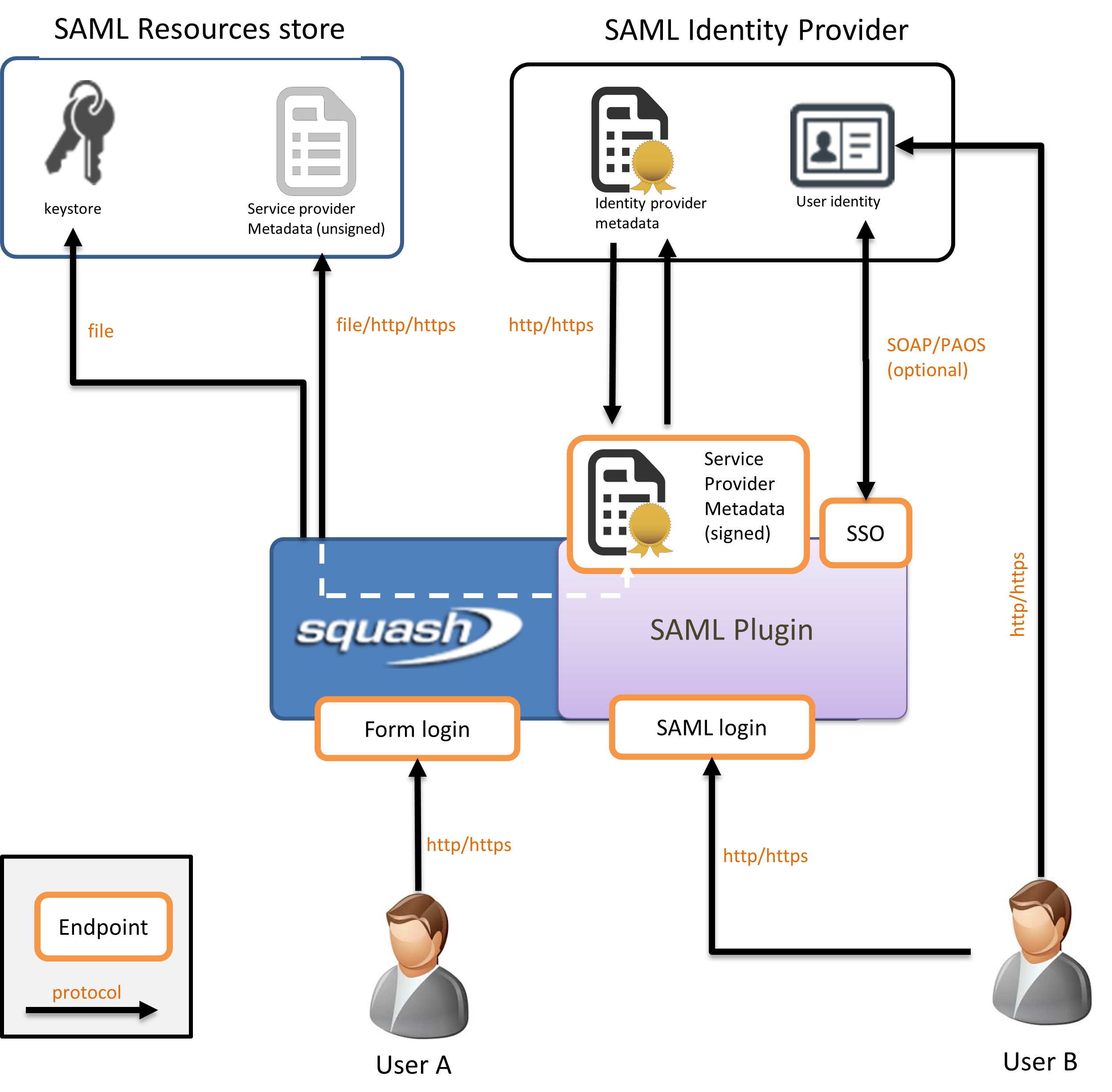
Users: The users want to access business resources detained by the service provider, after successful authentication by the identity provider.
Identity provider: The identity provider (IdP) holds the user directory. It is responsible for actually authenticating the users and, if successful, delivering authentication assertions if this occurred within a SSO conversation. The list of SAML services supported by the IdP are compiled and published in a file called IdP metadata, that defines which data will be traded and how.
Service provider: The service provider (SP) is the actual server the user intend to interact with, in our case SquashTM. It completely delegates authentication concerns to the IdP but still hold the authorizations. Like the IdP, it publishes its supported SAML features in the SP metadata.
SP/IdP metadata: These files publish the SAML features supported by the server they describe. Their content notably list the endpoints, the preferred SSO bindings (HTTP-POST, redirect etc), which user information are expected (and their format), and certificates used for encryption and signature.
At launch, SquashTM builds the SP metadata file from the configuration file properties and accesses the SP and IdP metadata. The SP metadata can be accessed via the URL /auth/saml/metadata/{registration-id} where the registration-id is the value entered in the configuration file. IdP metadata can be retrieved either locally or remotely via an HTTP(S) connection. In the example, IdP metadata is downloadable directly from the IdP.
The following step is metadata validation. This step mostly includes syntactic validation and metadata signature check, and optionally the certificates can also be checked for trust path and revocation (or you can simply assume them to be valid if you trust the source).
When all checks are done and good, SquashTM sign its SP metadata and publish them for consumption by third parties. This is a good time to configure the IdP and declare the instance of SquashTM as a valid source of authentication requests and provide it with the SP metadata if necessary.
At this stage the plugin is operational. SquashTM will interact with the IdP directly or indirectly (via the user's browser), depending on the SSO binding profile of choice. SquashTM can also be configured to work with proxies if one sits between the two servers and direct communication is required (not shown).
Use
By default, users can authenticate on SquashTM by the login form interface (/login) or the SAML SSO interface (/auth/saml/login/{registration-id}). The configuration allows to designate either of them as the main interface. By default, unauthenticated users are automatically redirected to that main interface. If a user wishes to use the other interface he/she can do so by explicitly accessing its URL.
On successful SAML authentication, the user context is created assuming the NameID transmitted with the authentication assertion as the login name (as defined in the metadata). The corresponding user account will be bound, otherwise, the user will be created and be able to log on but will not be able to access any project on SquashTM.
A user authenticated on SquashTM with SAML can change his/her local password in the user account preference page. Moreover, an admin can define one for him/her in the user administration page. A user authenticated via the SquashTM login form can change his/her password normally.
However, a user cannot change his/her SAML password from SquashTM.
It is possible to allow authentication only via the SAML SSO interface, see Authentication sources.
In this case, users cannot authenticate with their local account and they, or an admin, cannot change or define their local password.
If they are trying to access the /login page, they are redirected to the SAML SSO interface (auth/saml/login/{registration-id}).
Configuration
This section details the configuration step for installing the SAML Plugin. Here we will focus on the main configuration actions and options. More is available for finer customization of metadata and SSO handling, those will be covered in the next section.
The necessary steps for installing the plugin are:
- Deploying the binary;
- Configuring the application.
Deploying the binary
From the folder $SQUASH_HOME/plugin-files/saml/, copy the file .jarand paste it into the folder of the same name in your SquashTM $SQUASH_HOME/plugins/.
Service provider metadata
The SAML plugin generates SP metadata from configuration properties. To do this, it is necessary to provide a private key in PKCS8 format and the certificate X.509. Both are required for signing SP metadata and for encrypting SAML messages.
Creating a private key for SquashTM
The following command generates a private key in PKCS8 format:
openssl genpkey -algorithm RSA -pkeyopt rsa_keygen_bits:2048 -out private_key.pem
Exporting a certificate
Then, the following command allows to export the private key as a certificate valid for one year (adjust the duration if necessary):
openssl req -x509 -new -key private_key.pem -sha256 -day 365 -out squashtm.cer
Configuration
Using a dedicated file
The SAML plugin proposes many configuration properties and the configuration file is rather large (compared to other plugins for SquashTM). You can configure the plugin in its own file then reference it from the main configuration file, instead of inlining the content like former plugins would need to.
To do so, copy the file config/squash.tm.cfg-saml.properties and paste it in the home configuration directory. In the standalone distribution of SquashTM that directory is usually SQUASH_HOME/conf. Then edit the main configuration file SQUASH_HOME/conf/squash.tm.cfg.properties and link the plugin configuration file by adding/editing the property:
spring.profiles.include=saml
If this property was already set you can just append saml to the list, separated by a comma.
(Alternate) By inlining the properties
If this is more convenient to you, you can simply copy and paste the content of the plugin configuration into the main configuration file. No need to add or append saml to the profiles list.
Minimum configuration
The configuration file proposes many properties but only a few of them are required. SquashTM will not boot or function correctly if those are left blank or are set incorrectly.
The properties listed here are required. You will find details about them (allowed values etc) in the comments of the file squash.tm.cfg-saml.properties. More is also available further in this documentation.
saml.enabled: Main switch. This property allows you to enable or disable the plugin without commenting and without having to delete the jar file.
saml.idp.metadata-url: The location of the identity provider (IdP) metadata. Protocols file://, http:// and https:// are allowed. For example, file:///opt/squash-tm/conf/saml/FederationMetadata.xml or https://login.microsoftonline.com/entreprise.onmicrosoft.com/FederationMetadata/2007-06/FederationMetadata.xml.
saml.sp.registration-id: Unique identifier used to register your service provider (SP) in the plugin's SAML configuration. For example: google.
saml.sp.entity-id: SquashTM instance unique identifier. This value must be unique within your authentication ecosystem and will be communicated to the identity provider (IdP). For example: urn:squash-tm:saml or https://squash-tm.your-organization.com.saml.
saml.sp.metadata.private-key: Private key in PKCS8 format used by the service provider (SP) to sign requests and decrypt messages.
saml.sp.metadata.certificate: Service provider (SP) X.509 certificate used for signature validation and encryption.
Authentication sources
By default, users can either authenticate with their local SquashTM account or their SAML SSO account.
It is possible to allow authentication only with the SAML SSO account with the following property:
authentication.provider=saml
Advanced Configuration
The previous chapter introduced you to the general concerns of the Squash-SAML setup. In many cases the resulting configuration should fit in your environment. However, the plugin offers several options for further customization, for example advanced requirements for RSA encryption or to account for the layout of your network. This chapter covers these extra options and revisits a few elements introduced in the previous chapter.
Conventions
File path formats
Metadata can be retrieved by reading it as local or remote files by HTTP(S) calls, using the property saml.idp.metadata-url.
By HTTP(S): The file path is the plain URL where it can be downloaded. The protocol is either http:// or https://. Example: https://your.idp/metadata.xml
By the absolute path: URL pointing to a local file act effectively as absolute paths. The protocol in this case is file://. Example: file:///dev/squashtm/saml/idp.xml (for Linux), file://C:/appfolders/squashtm/conf/idp.xml (for Windows).
By path relative to the configuration folder: A path that defines no protocol will be regarded as paths relative to the configuration folder. The location of the configuration folder may vary depending on the environment and how SquashTM was installed. Example: saml/idp.xml -> resolves to $CONF_DIR/saml/idp.xml.
Property namespaces
The properties are grouped by namespaces that relate to actors (e.g. the IdP) or resources (e.g. the metadata). They are listed with the namespace omitted for the sake of conciseness, with the namespace stated on top of the related table. This format is convenient in the context of a documentation, however when editing the configuration file remember to state the fully qualified name of the property.
Main entry point
As introduced in the chapter Use, users can choose to log in either authentication system (the usual login form page or the SAML entry point), however one of them is set as the main entry point and if the user expresses no preference he/she will be redirected there for authentication.
SquashTM default sets the login form page as the main entry point. This can be modified in the configuration.
Options
Namespace: squash.security
| Property | Comments |
|---|---|
preferred-auth-url | This property drives SquashTM behavior regarding unauthenticated users' requests. It defines to which URL such users should be redirected, i.e. the main entry point. If that property is set to /auth/saml/login/{registration-id}, SAML will effectively become the main entry point.Note that this property belongs to SquashTM Core realm and is not specific to the SAML Plugin. If you use other authentication plugins, check their respective configuration to prevent possible conflicts over this. Default value: /login (the default login form page) |
Handling of the metadata
The metadata for SquashTM (as a service provider) is generated when the application starts and can be accessed via the URL /auth/saml/metadata/{registration-id}. Identity provider data can be retrieved locally or remotely (see above).
Due to the sensitive nature of these files, their content must be closely monitored. There are two ways to do this:
- either the metadata are signed and the signature is checked;
- either the source of the metadata is trusted and verified by other mechanisms (e.g. they come from an HTTPS server or a very private folder).
SP metadata options
Namespace: saml.sp.metadata
| Property | Comments |
|---|---|
name-id-format | Defines the format of the NameID used to identify the user in the SAML authentication request. Examples: - urn:oasis:names:tc:SAML:1.1:nameid-format:emailAddress- urn:oasis:names:tc:SAML:2.0:nameid-format:transient Default value: empty |
authn-requests-signed | Indicates whether SAML authentication requests sent by the SP should be signed. Default value: false |
single-logout-service-binding | Defines the type of binding (transport protocol) used by the SP to communicate with the IdP's Single Logout Service. Examples: - urn:oasis:names:tc:SAML:2.0:bindings:HTTP-POST- urn:oasis:names:tc:SAML:2.0:bindings:HTTP-RedirectDefault value: urn:oasis:names:tc:SAML:2.0:bindings:HTTP-POST |
Service Provider metadata exposure
SquashTM exposes the SP metadata to the URL /auth/saml/metadata/{registration-id} and signs them if you wish, unless they were already signed (metadata cannot be signed more than once).
SSO
The options listed here relate to the SSO process itself. You can tweak here the elements and conditions of the message exchanges. If the SP metadata exposes several alternatives for the same clause (like the <NameIDFormat>), you can also instruct here the plugin which value should be used instead of the default value for that clause.
In some instances, the property value must be picked from the SAML specification. Here are a few useful links:
Standard options
Namespace: saml.sso
| Property | Comments |
|---|---|
force-authN | If enabled, the user will have to reauthenticate with the IdP every time it needs to authenticate with SquashTM. This ensures that the user authentication assertion is update to date. However, this can be annoying if the authentication process on the IdP involves a human interaction: this would effectively disable the SSO mechanism. Default value: false |
provider-name | A human-readable name that will be included in messages sent to the IdP, useful for logging purposes. Default value: empty |
binding | The link type that SquashTM will use to initiate SSO with the IdP. That binding should be available in the IdP metadata. Examples: - urn:oasis:names:tc:SAML:2.0:bindings:HTTP-POST- urn:oasis:names:tc:SAML:2.0:bindings:HTTP-RedirectIn practice you would need to extract the desired value from the IdP metadata. Default value: the first binding method listed in the <SingleSignOnService> clause of the IdP metadata. |
assertion-consumer-index | Will ask the IdP to send its responses to the given consumer service. The list of available consumer services can be found in the <AssertionConsumerService> clauses in the SP metadata. The consumer services order are listed by the attribute index within the tag.Default value: if left blank, the default value will be used (with the attribute isDefault or with index=0). |
nameID | Which NameID should be returned by the IdP and which will be used as the SquashTM user principal name (its login). Examples: - urn:oasis:names:tc:SAML:1.1:nameid-format:emailAddress- urn:oasis:names:tc:SAML:2.0:nameid-format:transientDefault value: the IdP will choose among those specified in its copy of the SP metadata. |
allow-create | Notifies the IdP that creating new user is permitted when unknown. Note that here we are referring to the creation of a user on the IdP. It merely is SquashTM opinion on what the IdP should do, yet the IdP retains the final decision. In any case, when a user successfully authenticates on the IDd, SquashTM will create a user account for him/her if it does not already exist as explained in section Use. The present property has nothing to do with it. Default value: false |
passive | If enabled, SquashTM will inform the IdP that it does not consider user interaction necessary for authentication, which could spoil the user experience. Note that the IdP may (understandably) disagree. Default value: false. |
relay-state | An arbitrary token to be sent back and forth to the IdP. It's part of the SAML specification but SquashTM has no concrete use case for it. The value can be anything. Default value: empty |
Scoping
The use of message Scoping allows for advanced SSO conversations. For instance, you can ask for guarantees over the quality of the user authentication on the IdP's end (by specifying an auth context), or restrict which IdPs are trusted in a multi-layered IdP architecture.
The following properties will be processed only if scoping is enabled.
Namespace: saml.sso (same as for the standard options)
| Property | Comments |
|---|---|
include-scoping | Main switch for the scoping. If false, the other options listed here will be disabled. Default value: false |
allowed-idps | This property configures the clause <IDPList>. In a multi-layered IdP architecture, this list defines which IdPs are allowed to process an authentication request. The value is a comma-separated list of IdP entityIDs.Default value: empty (no restrictions) |
proxy-count | Maximum proxy hops allowed for authentication messages. In this context, a proxy means an IdP within a multi-layered architecture. A value of 0 forbids the use of proxies: the IdP that receives the authentication request cannot delegate and must authenticate the user itself.Default value: 2 |
authn-contexts | A comma-separated list of authentication contexts that should be honored by the IdP when it authenticates the user. Useful when the default IdP authentication challenge is not deemed sure enough and SquashTM asks for guarantees of a more stringent process. Examples or possible values: - urn:oasis:names:tc:SAML:2.0:ac:classes:SmartcardPKI- urn:oasis:names:tc:SAML:2.0:ac:classes:MobileTwoFactorContractDefault value: empty (no restrictions) |
authn-context-comparison | Additional requirements about the handling of the credentials presented by the user during authentication on the IdP. The allowed values are: exact, minimum, maximum, better.Default value: exact. |
Authentication expiration
Periodically SquashTM will invalidate an authentication assertion unilaterally if it reaches an expiration duration set in its configuration (just as the Identity Provider can set an expiration date on its own assertions). The user must then reauthenticate on the Identity Provider. This can lead to loss of unsaved work if this occurs and the server was unable to save the failed requests. For this reason, users are encouraged to reauthenticate on their own on the Identity Provider at the time of their choosing.
Focus
The user must reauthenticate on the identity provider even when his/her session on the IdP is still valid because SquashTM will reject the authentication if the same assertion is presented.
Options
Namespace: saml.session
| Property | Comments |
|---|---|
max-auth-time | Defines the lifetime in seconds of an authentication assertion before the user must reauthenticate on the Identity Provider. Default value: 864000 (about ten days) |
max-assertion-time | Defines the validity period of an authentication assertion during SSO in seconds. The SSO procedure must be completed before this time. Default value: 3000 |
clock-skew | Sets the maximum tolerance in seconds for clock offsets between the service provider (SP) and the identity provider (IdP). Default value: 300 |
Proxy
If SquashTM is served through a reverse-proxy or a load balancer, the modifications applied to URLs and schemes can induce mismatches between the actual and expected requests. You can declare in the configuration that proxy in order to instruct SquashTM how to carry out these rewrites when exchanging messages with the identity provider (IdP).
Options
Namespace: saml.proxy
| Property | Comments |
|---|---|
enabled | Main switch that enables the proxy and the other options below. Default value: false |
server-name | The hostname of the reverse proxy. This property has no default value and must be provided. Default value: empty |
scheme | The scheme used by the reverse proxy for outbound communications. Default value: https |
server-port | The port used by the reverse proxy for outbound communications. Default value: 443 |
context-path | The context path of the application, as served by the reverse proxy. Default value: /squash |
include-port-in-url | Whether the port number should be explicitly included in the request URL (even when a default port is used and could be omitted). Default value: true |
User Account Information
Depending on the configuration of the IPD server, the assertions in response to authentication requests may contain additional information regarding the user account. In the document of the assertion those extra attributes are listed under the <AttributeStatement> tag. The properties listed below allow SquashTM to use them.
Please note that SquashTM will not ask for those attributes by the mean of a Requested Attributes clause (see SAML Protocol Extension for Requesting Attributes per Request), because that feature is not always supported and depends on the IdP implementer. Instead, you should make sure that the IdP will attach those attributes to the assertion unconditionally.
Options
Namespace: saml.user-mapping
| Property | Comments |
|---|---|
alternate-username | Uses the value of that attribute as the username in SquashTM instead of the nominal NameID. It allows you to work around the limitations of the IdP if it cannot provide with the NameIDFormat you need (eg older versions of Azure).Default value: |
first-name | Maps one of the extra attribute values as the first name of a user account in SquashTM. This feature is used only when user account is to be created in SquashTM (a new user): pre-existent user account will not be updated this way. Default value: |
last-name | Maps one of the extra attribute values as the last name of a user account in SquashTM. This feature is used only when user account is to be created in SquashTM (a new user): pre-existent user account will not be updated this way. Default value: |
email | Maps one of the extra attribute values as the email of a user account in SquashTM. This feature is used only when user account is to be created in SquashTM (a new user): pre-existent user account will not be updated this way. Default value: |
Logging
If you experience troubles using SAML you can enable finer logging to find out what is going wrong. To do so add the following lines to the configuration:
logging.level.org.squashtest.tm.plugin.saml=TRACE
logging.level.sqsaml.org.springframework.security=TRACE
logging.level.org.springframework.security.web.authentication=TRACE
logging.level.org.opensaml=TRACE
TRACE is the finest logging level available. If this is too verbose you can use the DEBUG level instead.
Focus
SquashTM must be restarted to take into account for your new configuration.