Import Automated Test Results from Pipelines
Disclaimer
On SquashTM Cloud instances, this feature is available with a SquashTM Ultimate license.
SquashTM allows you to import the results of automated tests executed in a CI/CD pipeline.
This is done via an API call (see details), which will create a new automated test suite linked to the targeted iteration.
Prerequisites
In order to import test results, an iteration must already exist in SquashTM and its execution plan must be populated with the tests for which results will be imported.
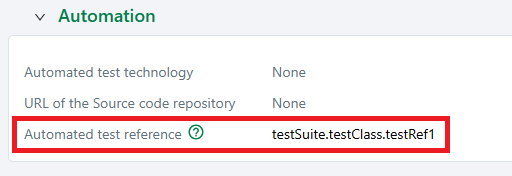
Each of these tests must have a unique (in the iteration's execution plan) automated test reference.
All of these steps can be done via the API if needed:
- Create test cases: POST request to
/test-caseswith the automated_test_reference field filled; - Create a campaign: POST request to
/campaigns; - Create an iteration: POST request to
/campaigns/{campaign_id}/iterations; - Add tests to an iteration: POST request to
/iterations/{iteration_id}/test-plan.
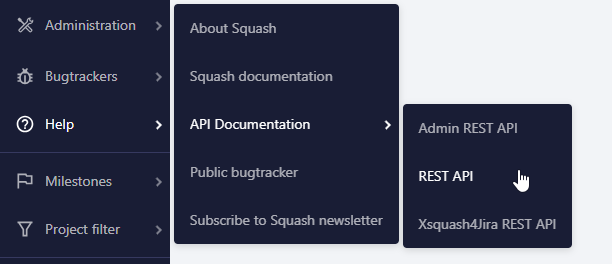
For more details on these requests, refer to the API documentation available in SquashTM.
Mapping Information
Results will be reintegrated into SquashTM by matching the automated test reference provided in the API request with that of the test in the execution plan of the selected iteration.
If some test cases use datasets, mapping will rely on both the automated test reference and the dataset name associated with the ITPI.

The following information can be reported:
- the test status;
- the execution duration of the test;
- the messages of failed assertions;
- the attachments related to test executions;
- the custom fields related to test executions.
It is also possible to add attachments at the test suite level.
The test suite status will be automatically calculated based on the individual test results, but can also be overridden if needed.
API Endpoint Documentation
POST /import/results/{iteration_id}
🔸 Path Parameter
| Name | Type | Required | Description |
|---|---|---|---|
iteration_id | integer | ✅ Yes | ID of the iteration. Must be greater than or equal to 1. |
🔸 Request Body
Note: There are two types of required fields:
- 🔴 : Fields that block the import if they are missing.
- 🟡 : Fields that will result in their current object being rejected if they are invalid or missing, but not blocking the rest of the import.
Content-Type: application/json
Authentication: Bearer token
| Field | Type | Required | Description |
|---|---|---|---|
┌─ automated_test_suite | object | No | Info about the test suite execution. |
│ ├─ status | string | No | Test suite status: BLOCKED, CANCELLED, SUCCESS, RUNNING, SKIPPED or FAILURE. If not provided, it will be auto-calculated. |
│ └─ attachments | array of objects | No | Files attached to the suite. |
│ ├─ name | string | 🟡 Yes | File name with its extension, among txt, html, xml or doc (e.g., report.html). |
│ └─ content | string | 🟡 Yes | Base64-encoded content, with a maximum size defined by the SquashTM instance. |
└─ tests | array of objects | 🔴 Yes | Individual test results. |
├─ reference | string | 🔴 Yes | Unique test identifier (used to map with SquashTM). Example: testSuite.testClass.testRef1 |
├─ dataset_name | string | No | Dataset name used in SquashTM. |
├─ status | string | 🔴 Yes | Test status: BLOCKED, CANCELLED, SUCCESS, RUNNING, SKIPPED, FAILURE, or READY. |
├─ duration | integer | No | Test duration in milliseconds. |
├─ failure_details | array of strings | No | List of failure messages. |
├─ attachments | array of objects | No | Files related to the test. |
│ ├─ name | string | 🟡 Yes | File name with its extension, among those accepted by the SquashTM instance (e.g., screenshot.png, if png has been added at the system level). |
│ └─ content | string | 🟡 Yes | Base64-encoded content, with a maximum size defined by the SquashTM instance. |
├─ test_steps | array of objects | No | Details of individual test steps. The number of these steps must be equal to the number of test steps in the corresponding test case. |
│ ├─ status | string | 🟡 Yes | Test step status: BLOCKED, CANCELLED, SUCCESS, RUNNING, SKIPPED, FAILURE, or READY. |
│ └─ attachments | array of objects | No | Files related to the test step. |
│ ├─ name | string | 🟡 Yes | File name with its extension, among those accepted by the SquashTM instance (e.g., screenshot.png, if png has been added at the system level). |
│ └─ content | string | 🟡 Yes | Base64-encoded content, with a maximum size defined by the SquashTM instance. |
└─ custom_fields | array of objects | No | Custom fields related to the test. |
├─ code | string | 🟡 Yes | Code of the custom field as defined in SquashTM. |
└─ value | string / integer / boolean / array of strings | 🟡 Yes | Value of the custom field. The type depends on the configuration of the field in SquashTM. |
Example:
{
  "automated_test_suite": {
    "attachments": [
      {
        "name": "report.html",
        "content": "Base64-encoded content here..."
      }
    ]
  },
  "tests": [
    {
      "reference": "testSuite.testClass.testRef1",
      "dataset_name": "admin_dataset",
      "status": "FAILURE",
      "duration": 35000,
      "failure_details": ["1 is not equal to 2"],
      "attachments": [
        {
          "name": "screenshot.png",
          "content": "Base64-encoded content here..."
        }
      ],
      "test_steps": [
        {
            "status": "SUCCESS"
        },
        {
          "status": "FAILURE",
            "attachments": [
              {
                "name": "step_screenshot.png",
                "content": "Base64-encoded content here..."
              }
            ]
        }
      ],
      "custom_fields" : [ {
        "code" : "NUMERIC",
        "value" : 200
      }, {
        "code" : "TEXT",
        "value" : "description"
      }, {
        "code" : "CHECKBOX",
        "value" : "true"
      }, {
        "code" : "TAGS_RELATED",
        "value" : ["tag1", "tag2"]
      } ]
    }
  ]
}
🔸 Responses
| Code | Meaning | Notes |
|---|---|---|
204 | ✅ All results successfully imported into SquashTM. | |
207 | ⚠️ Partial success – some results could not be imported. | Response body includes error details, for example: |
400 | 🛑 Bad request | Invalid input. |
401 | 🔒 Unauthorized | Authentication required. |
403 | 🚫 Forbidden | Access denied. |
404 | ❓ Not found | Iteration not found. |
412 | 🛑 Precondition failed | Request body is missing one or more required fields and the import has been aborted. Response body includes error details, for example: |
500 | ❌ Internal error | Unexpected server error. |