Automation with SKF
Test reference in SquashTM
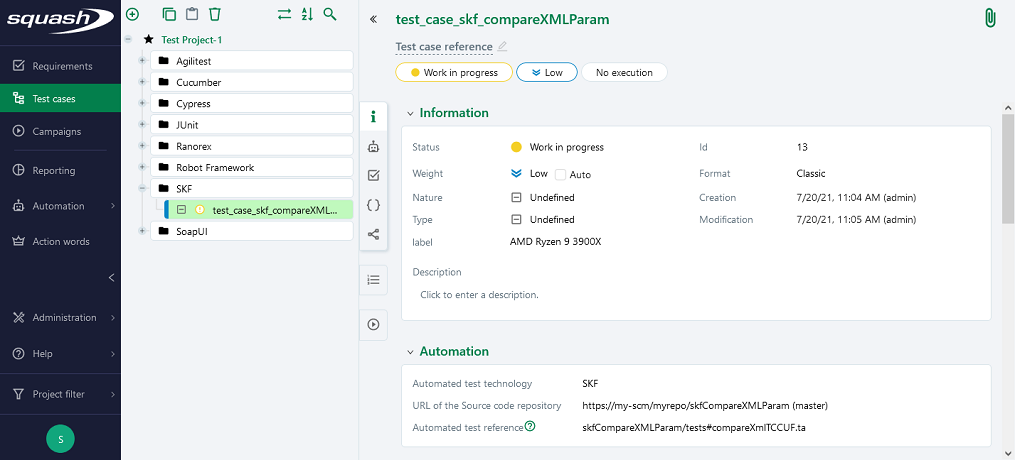
In order to bind a SquashTM test case to a SKF automated test, the content of the Automated test reference field of the Automation block of a test case must have the following format:
[repository]/[ecosystem].[sub_ecosystem]#[script]
or[repository]/[ecosystem]#[script]
(The reference always contains a single # character.)
with:
[repository]: Path to the root SKF folder (which contains the pom.xml file) on the source repository.[ecosystem]: Default test ecosystem of the SKF project (tests).[sub_ecosystem]: Child test ecosystem (it is possible to add several ones by separating them by.).
This parameter is optional, i.e. it can be absent.[script]: Name of the test script to run (with its.taextension; this parameter is mandatory)
Nature of the exploitable SquashTM parameters
The exploitable SquashTM parameters will differ depending on whether you're using the Community/Premium or Ultimate version of SquashTM.
Here is a table showing the exploitable parameters (these parameters are transmitted as test parameters, see below, SquashTM does not generate global parameters):
| Nature | Key | Community/Premium | Ultimate |
|---|---|---|---|
| Name of the dataset | DSNAME | ✅ | ✅ |
| Dataset parameter | DS_[name] | ✅ | ✅ |
| Execution ID | TC_EXECUTION_ID | ❌ | ✅ |
| Test case reference | TC_REFERENCE | ✅ | ✅ |
| Test case internal UUID | TC_UUID | ✅ | ✅ |
| Test case custom field | TC_CUF_[code] | ✅ | ✅ |
| Iteration custom field | IT_CUF_[code] | ❌ | ✅ |
| Campaign custom field | CPG_CUF_[code] | ❌ | ✅ |
| Test suite custom field | TS_CUF_[code] | ❌ | ✅ |
Legend:
[code]: Value of the "Code" of a custom field[name]: Name of a datasset
As indicated, SquashTM adds a prefix to the code of the transmitted custom field. Make sure to take it into account.
Availability of the execution ID
TC_EXECUTION_ID is only available with Squash TM 8.0 or later.
Parameters usage
It is possible, when running SKF tests, to exploit parameters within it. A parameter can be a test parameter or a global parameter. SquashTM transmits only test parameters. Test parameters and global parameters can be used in the case of a launch from a CI/CD pipeline with the skf/params action.
Test parameters are available in SKF as script context parameters.
Global parameters are available as global context parameters.
In order to achieve this, it is necessary to (see the SKF documentation):
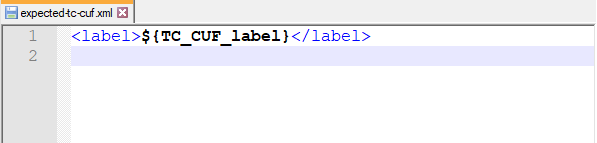
Call the desired parameters inside the files used by the SKF test by using the
${key}syntax.In the SKF test, use the following command to replace, in a file, the parameter references by the values transmitted at execution:
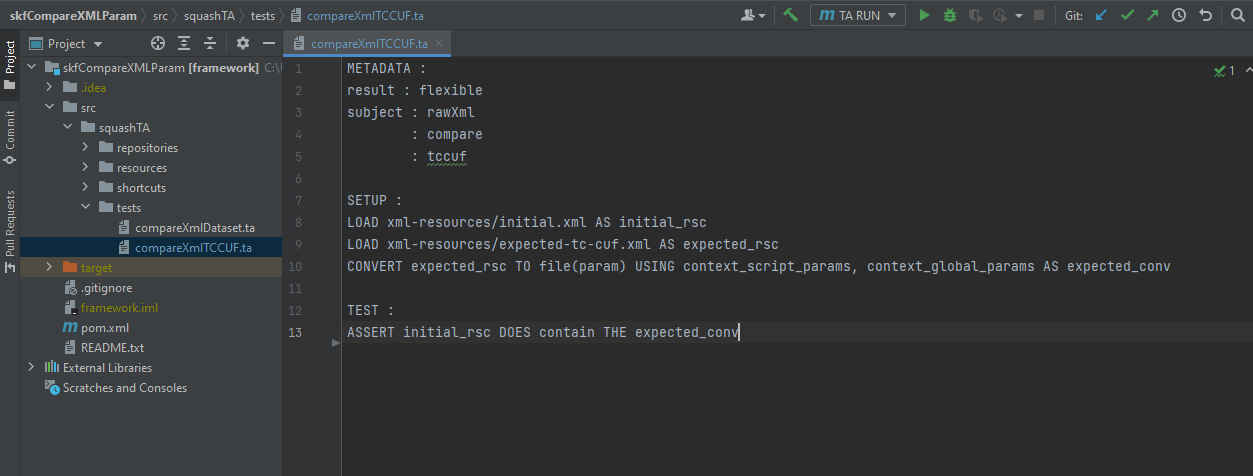
CONVERT {resourceToConvert<Res:file>} TO file (param) USING context_global_params, context_script_params AS {converted<Res:file>}
Example
Below is an example of a SKF project using a parameter in a XML file and the corresponding SquashTM test case automation:
Supported versions
SquashTM has been validated with with the following version of SKF.
| Testing Technology | Version |
|---|---|
| SKF | 1.14.0 |
Compatibility with Maven 3.8.1 or later
Maven 3.8.1 (or later) blocks repositories accessed through http (see Maven Release Notes). This has the effect of preventing the SoapUI Plugin to access SmartBear's Maven repository.
The solution is to declare the repository as https in your pom.xml file:
<pluginRepository>
    <id>smartbear</id>
    <name>smartbear</name>
    <url>https://rapi.tools.ops.smartbear.io/nexus/content/groups/public</url>
</pluginRepository>