Automation with UFT
This feature is available only in the Ultimate version of SquashTM.
Warning
SquashTM current version only supports "GUI Testing". "API Testing" and "BPT Testing" are not available yet.
Test configuration
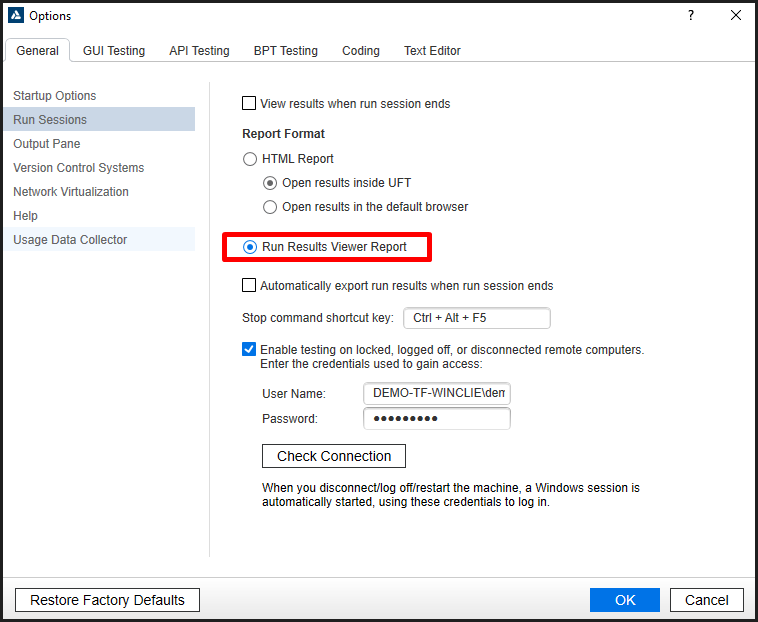
The result publication in SquashTM requires UFT be configured to generate a "Run Result Viewer Report":
(This configuration is tied to the test, so it has to be committed in the Git repository.)
Date Format Configuration
UFT uses the date format of the execution environment when generating its reports.
The environment variable UFT_DATE_FORMAT can be defined in SquashTM Orchestrator so that the interpreter uses the correct format when parsing execution time.
For example, the U.S. English date format can be specified as:
UFT_DATE_FORMAT="M/d/yyyy - HH:mm:ss"
If this variable is not defined, the default European format "dd/MM/yyyy - HH:mm:ss" will be used.
The following documentation provides more details about the format supported by the environment variable: DateTimeFormatter.
Test reference in SquashTM
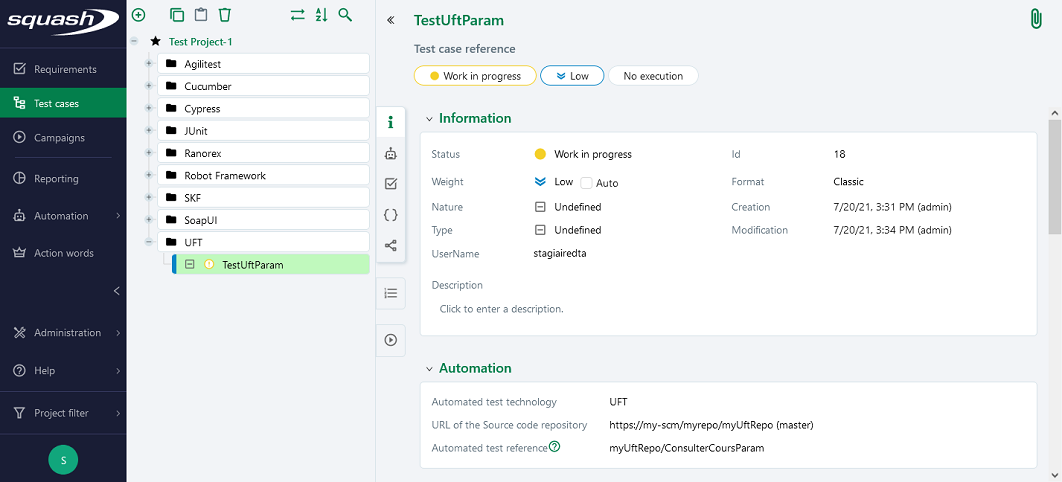
In order to bind a SquashTM test case to a UFT automated test, the content of the Automated test reference field of the Automation block of a test case must have the following format:
[repository]/[folder]
with:
[repository]: Name of the Git repository.[folder]: The path to the test folder to execute.
Nature of the exploitable SquashTM parameters
Here is a table showing the exploitable parameters (these parameters are transmitted as test parameters, see below, SquashTM does not generate global parameters):
| Nature | Key |
|---|---|
| Name of the dataset | DSNAME |
| Dataset parameter | DS_[name] |
| Execution ID | TC_EXECUTION_ID |
| Test case reference | TC_REFERENCE |
| Test case internal UUID | TC_UUID |
| Test case custom field | TC_CUF_[code] |
| Iteration custom field | IT_CUF_[code] |
| Campaign custom field | CPG_CUF_[code] |
| Test suite custom field | TS_CUF_[code] |
Legend:
[code]: Value of the "Code" of a custom field[name]: Name of a datasset
As indicated, SquashTM adds a prefix to the code of the transmitted custom field. Make sure to take it into account.
Availability of the execution ID
TC_EXECUTION_ID is only available with Squash TM 8.0 or later.
Parameters usage
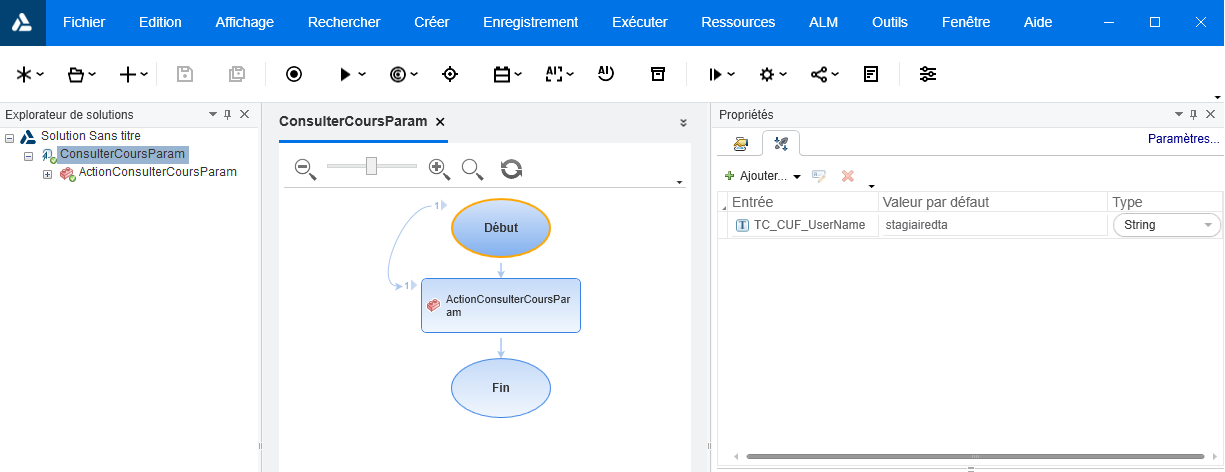
It is possible, when running UFT tests, to exploit parameters within it. A parameter can be a test parameter or a global parameter. SquashTM transmits only test parameters. Test parameters and global parameters can be used in the case of a launch from a CI/CD pipeline with the uft/params action.
Each parameter is available in UFT as a test parameter (see the UFT documentation).
If the same name is used for a global parameter and a test parameter, the latter is taken into account in UFT.
Example
Below is an example of a UFT solution and the corresponding SquashTM test case automation:
Supported versions
SquashTM has been validated with the following versions of UFT. More recent versions should work properly.
| Testing Technology | Version |
|---|---|
| UFT 💎 | 15.0.2 |