Configuring ADFS and Azure AD to use the SAML plugin on SquashTM
Warnings
- This procedure complements the procedures on the SAML plugin on SquashTM. It is intended for Microsoft AD Azure and ADFS products. Please refer to the main documentation page for information on configuring SquashTM.
- The configuration described here is minimal, as each company has its own implementation, its own directories, etc.
Prerequisites
An up-to-date and operational Microsoft subscription or product.
Application creation
SquashTM is not part of the Azure AD gallery, so you need to create your application.
- Go to the Enterprise Application Portal.
- Click on [New application].
Configuration
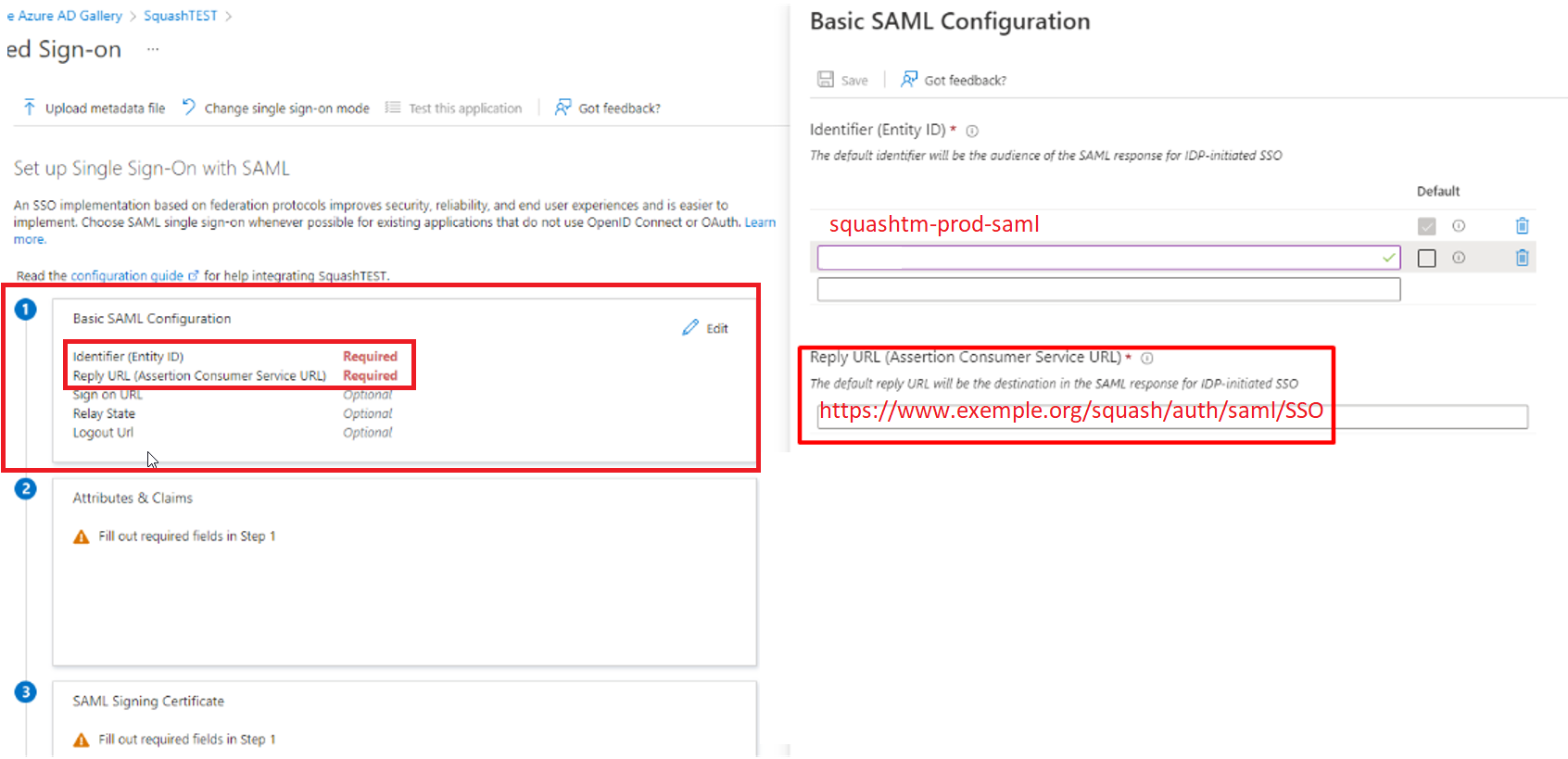
Tab 1
Fill in the fields:
- Identifier (Entity ID) which corresponds to the entityID declared in the
sp.xmlfile on SquashTM; - Reply URL with the following default value (replace domain):
https://squash.domain.com/squash/auth/saml/SSO.
Tab 2
Fill in the fields with the usual values to retrieve the required directory information.
Tab 3
Tab for declaring and retrieving the IdP certificate.
The two tabs in field 1 are mandatory, the others are optional, as Microsoft does not require them to be filled in.
Verification
Return to SquashTM and test the authentication.