Reports
Manage Reports
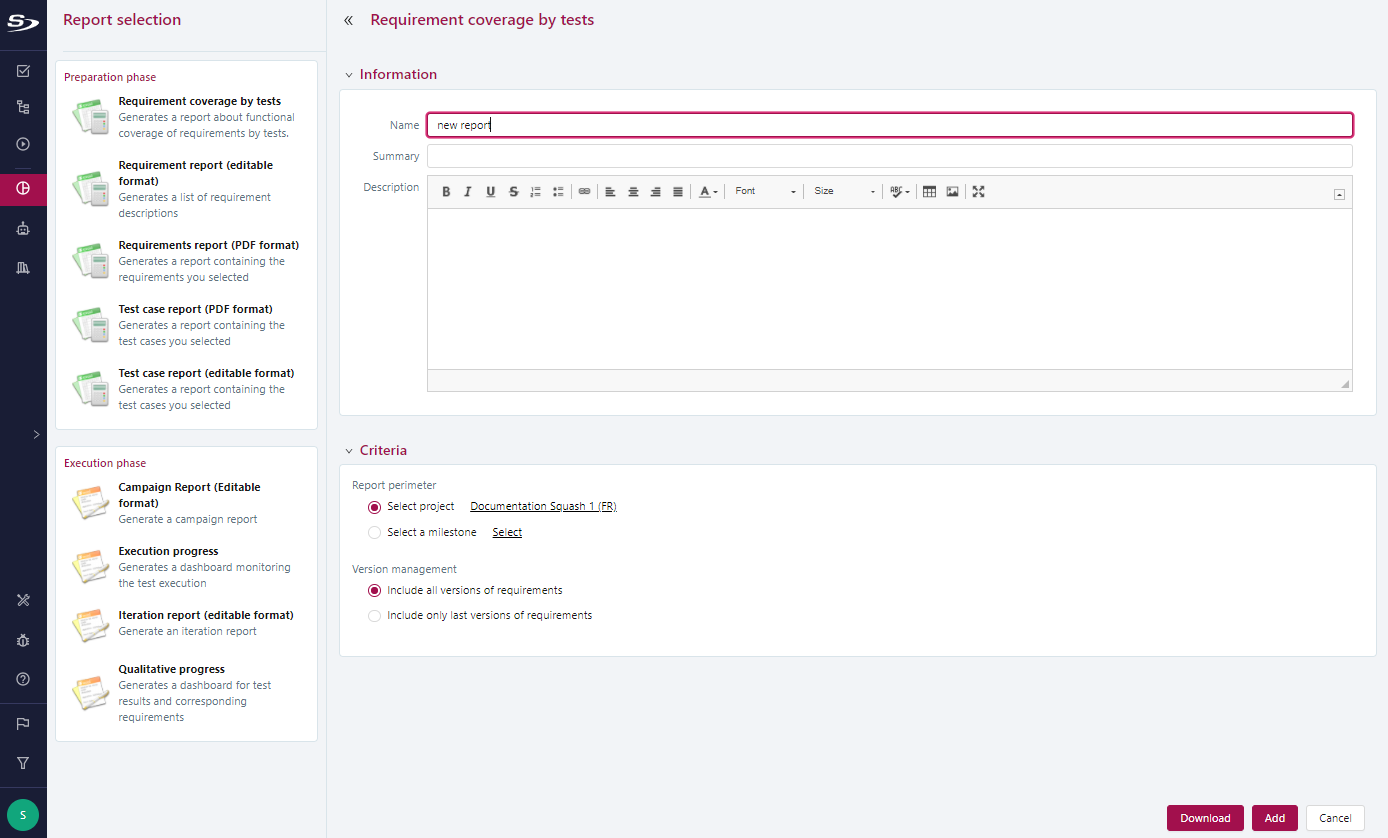
To generate a report from the Reporting workspace, click on the button  , then on Add a report. A page appears with all the types of reports available in SquashTM.
By clicking on the report you want, the blocks Information and Criteria appear. Once you have entered your information and selected your criteria, click on [Download] to generate the report, or [Add] to save it in the project.
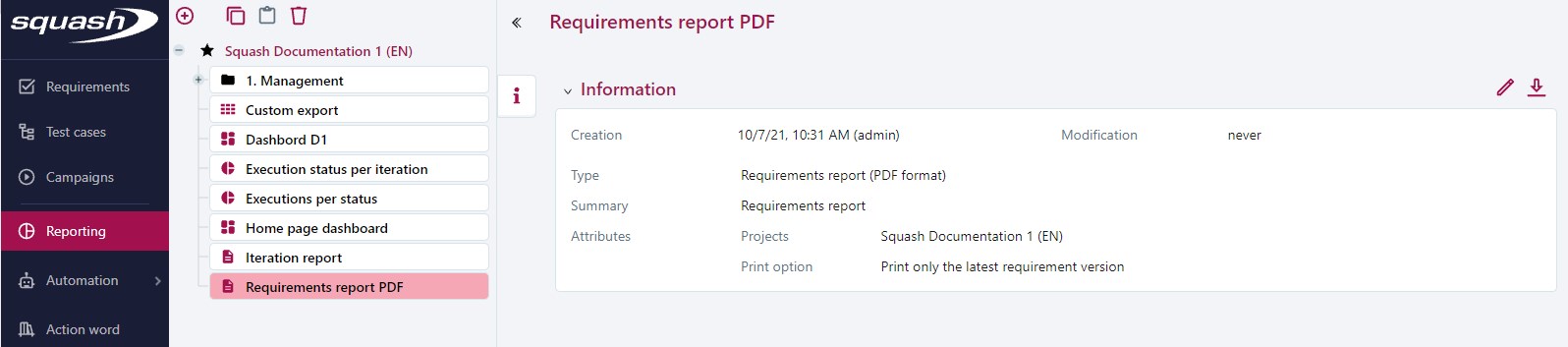
Once the report is saved, it appears in the tree, and the attributes from which it was created can be viewed from the Information anchor.
You can edit the report via the button  and download it via the button
  .
.
Reports of the Preparation phase
Requirement Reports
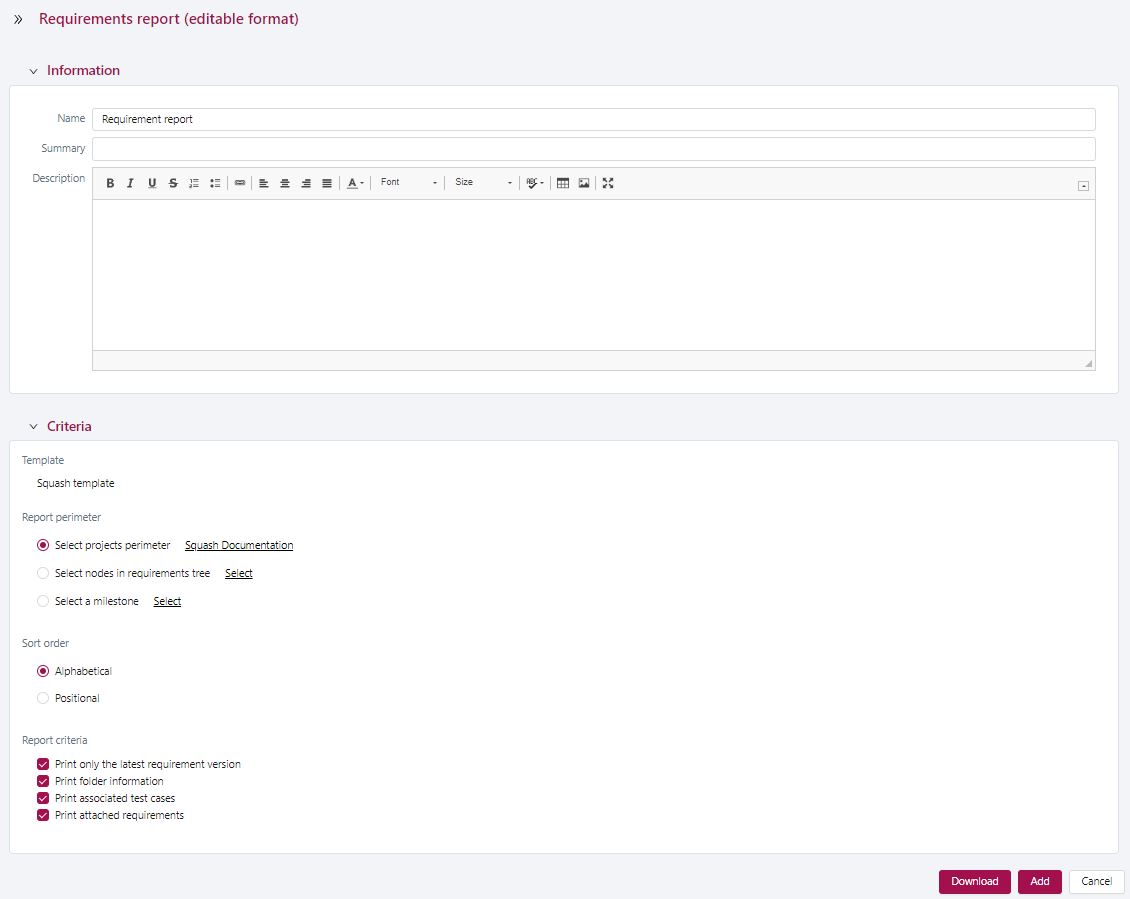
The Requirement Report can be generated in PDF or Word format.
It can contain:
- all the requirements of one or multiple projects;
- one or multiple requirements from one or multiple projects;
- the requirements associated with a milestone.
It can also contain additional information such as:
- the test cases verifying the requirements;
- the links with other requirements;
- the requirements folders' information.
It is possible to select the order in which items are displayed in the report: alphabetical or positional.
Info
For the report Requirement Report (PDF format), the printing options Print associated test cases, Print attached requirements, and Print folder information are not available.
Focus
- You can only select projects or requirements when you have selected one of these options. Otherwise, by default, SquashTM will display all the requirements of the first selected project;
- If the option Print last requirement version only is checked, only the last version of the requirement will be in the report. Otherwise, all versions of the requirement will be in the report.
Note: when the report scope is for a milestone, the latest version of the requirement will be printed only if it is associated with the selected milestone. Otherwise, the requirement will be considered outside the scope and will not be present in the report; - In Word, the table of contents and index of the requirements must be manually updated. For this, select them and press F9.
Test Case Reports
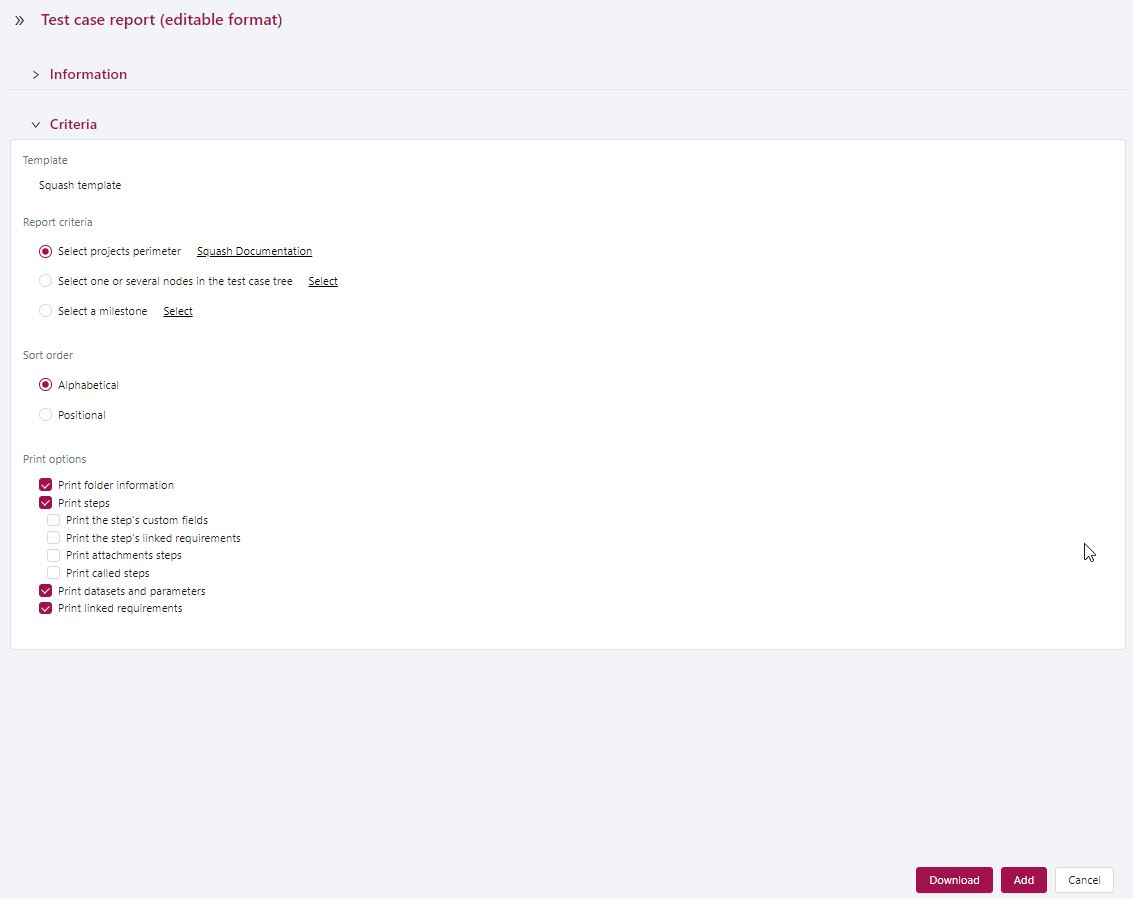
The Test Case Report can be generated in PDF or Word format.
It can contain:
- all the test cases of one or multiple projects;
- one or multiple test cases of one or multiple projects;
- the test cases associated with a milestone;
- the test cases associated with a "tag" custom field.
It can also contain additional information such as:
- the test steps;
- the custom fields associated with the test steps;
- the requirements linked to the test steps;
- the number of attachments linked to the test steps;
- the test steps of the called test cases;
- the parameters and datasets;
- the associated requirements;
- the test cases folders' information.
It is possible to select the order in which items are displayed in the report: alphabetical or positional.
Info
For the report Test Case Report (PDF format), the printing options Print the step's linked requirements, Print the step's number of attachments, and Print folder information are not available.
Focus
- You can only select projects or test cases if you have selected one of these options. Otherwise, by default, SquashTM will display all the test cases of the first selected project;
- The printing options are checked by default, but their sub-options are not;
- In Word, the table of contents and requirement index must be manually updated. For this, select them and press F9.
Requirement Coverage Report
The Requirement coverage by tests report is a dashboard to monitor the test cases' functional coverage of the requirements.
Generated from the perimeter of one or multiple projects or of a milestone, it offers two monitoring tables:
- the requirements coverage table;
- the project's requirements list.
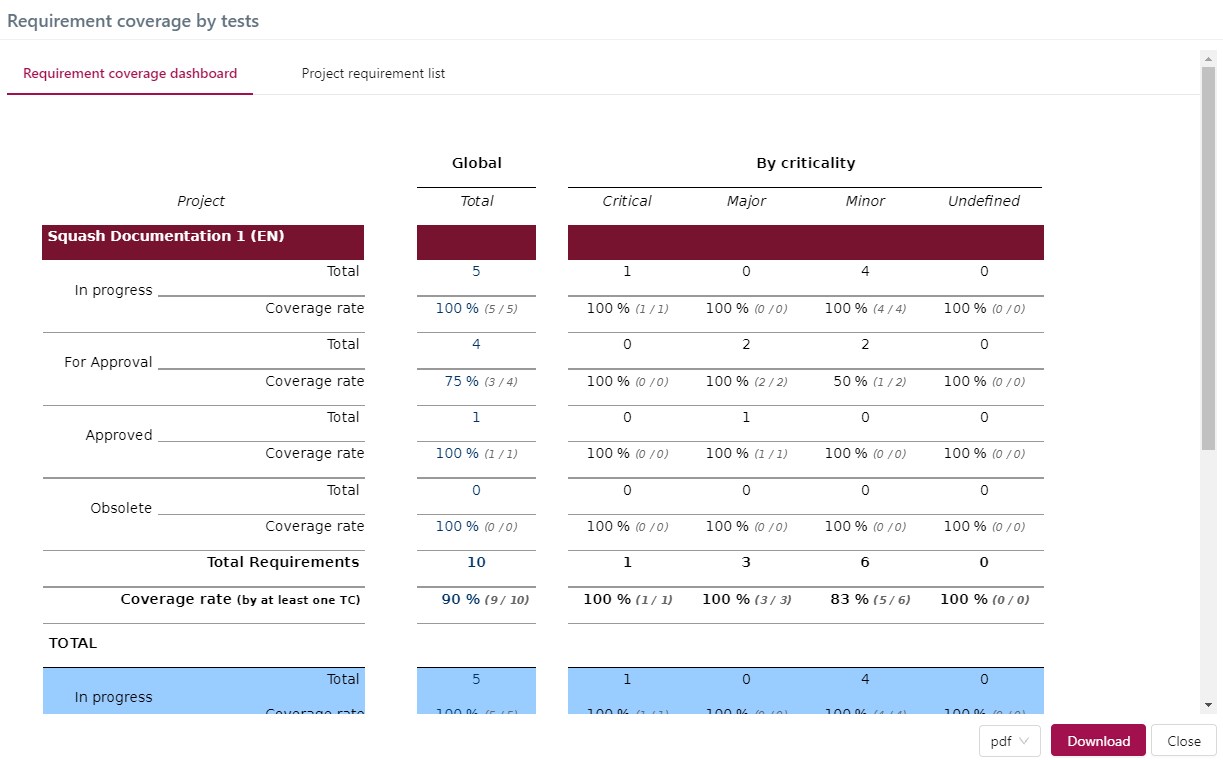
The requirements coverage table shows the total number of requirements per project, broken down by criticality level and status. The percentage of requirements covered by at least one test case is indicated for each category. This table enables you to focus your test writing efforts on the most critical requirements. At the end of the document, in the blue part, there is the total coverage of all the selected projects.
The Project requirement list displays the version and criticality of each requirement as well as the number of test cases covering them.
Learn more
To find out more about the requirements coverage rate, visit the dedicated page "Follow requirement coverage and validation".
Info
You can export the generated reports in different formats:
- The requirements coverage table can be exported in the formats:
.pdfand.html; - The Project requirement list can be exported in the formats:
.xls,.csv,.pdf, and.html.
Reports of the Execution phase
Info
These reports cover the execution phase carried out with campaigns and iterations. The validation phase conducted with sprints will be included in a future version.
Execution Progress
The Execution progress report is a dashboard to monitor test executions. The Execution progress window is displayed with the Information and Criteria blocks when clicking on Execution progress on the Report selection page. The Criteria block enables you to determine the campaign perimeter for the report:
- Report scope: by default, SquashTM generates the progress report on all campaigns. It is possible to modify the scope by selecting the desired option;
- Schedule: the user can enter the start and end dates (scheduled and/or actual). These fields are optional;
Campaign Status:
- All (default value);
- Running: campaigns with at least an iteration and a test case with the status "Ready" or "Running";
- Done: campaigns with no iteration containing a test case with the status "Ready" or "Running".
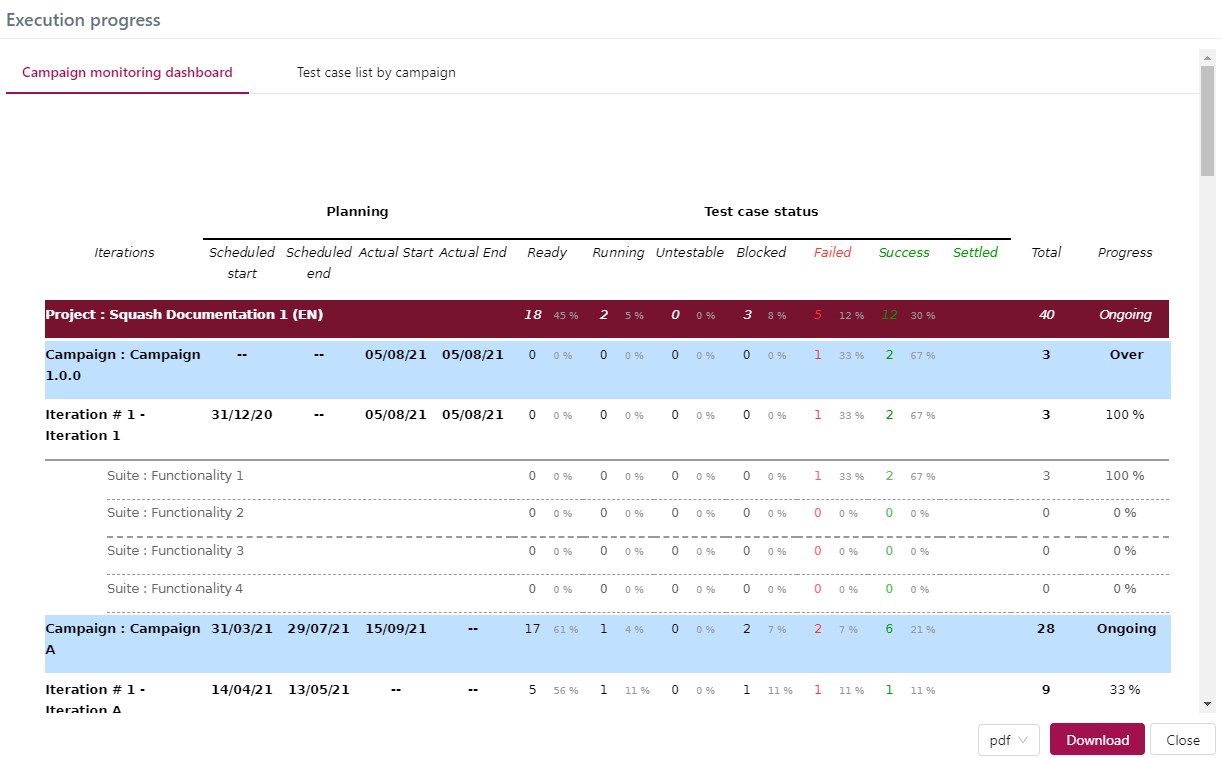
For this report, two tables are generated: The Campaign monitoring dashboard contains the campaigns' schedule and the details of the test cases' execution statuses by test suite.
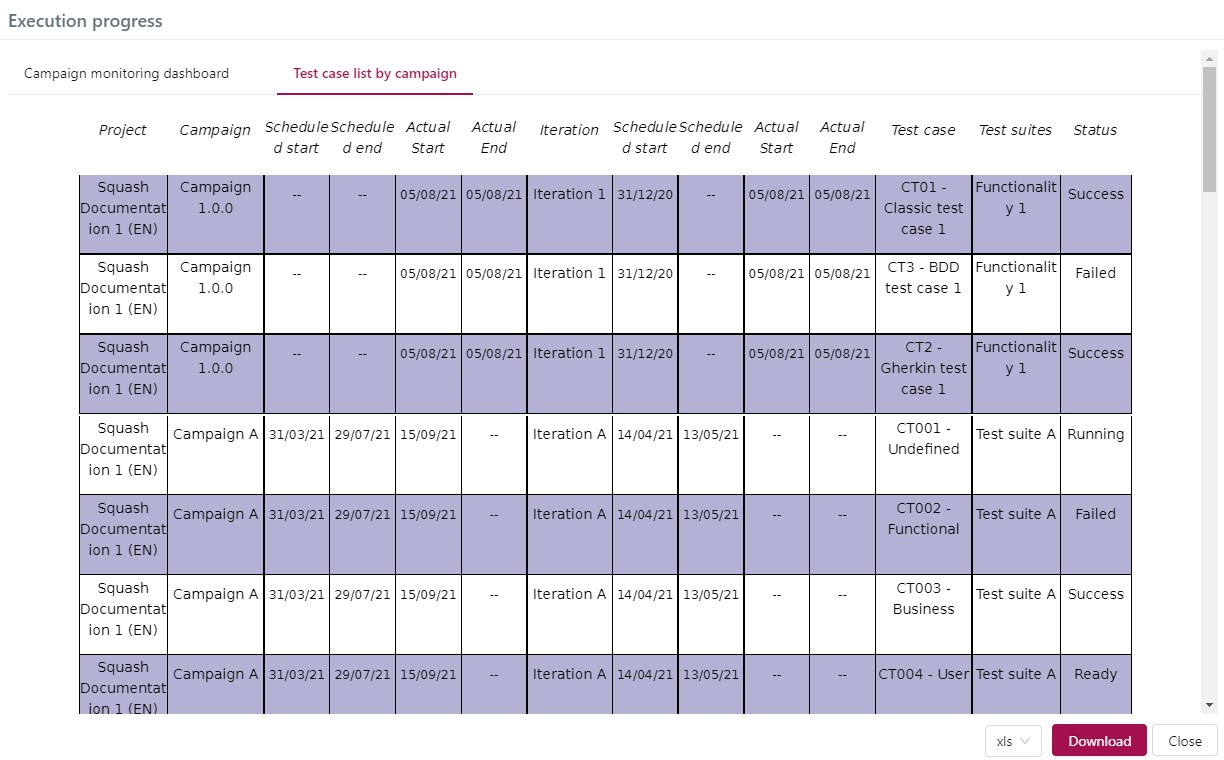
The Test case list by campaign displays a detailed list of the test cases by campaign, iteration, and test suite, along with their execution status.
Info
To export Execution progress reports, follow the same procedure as for Requirement coverage by tests reports.
Qualitative Progress
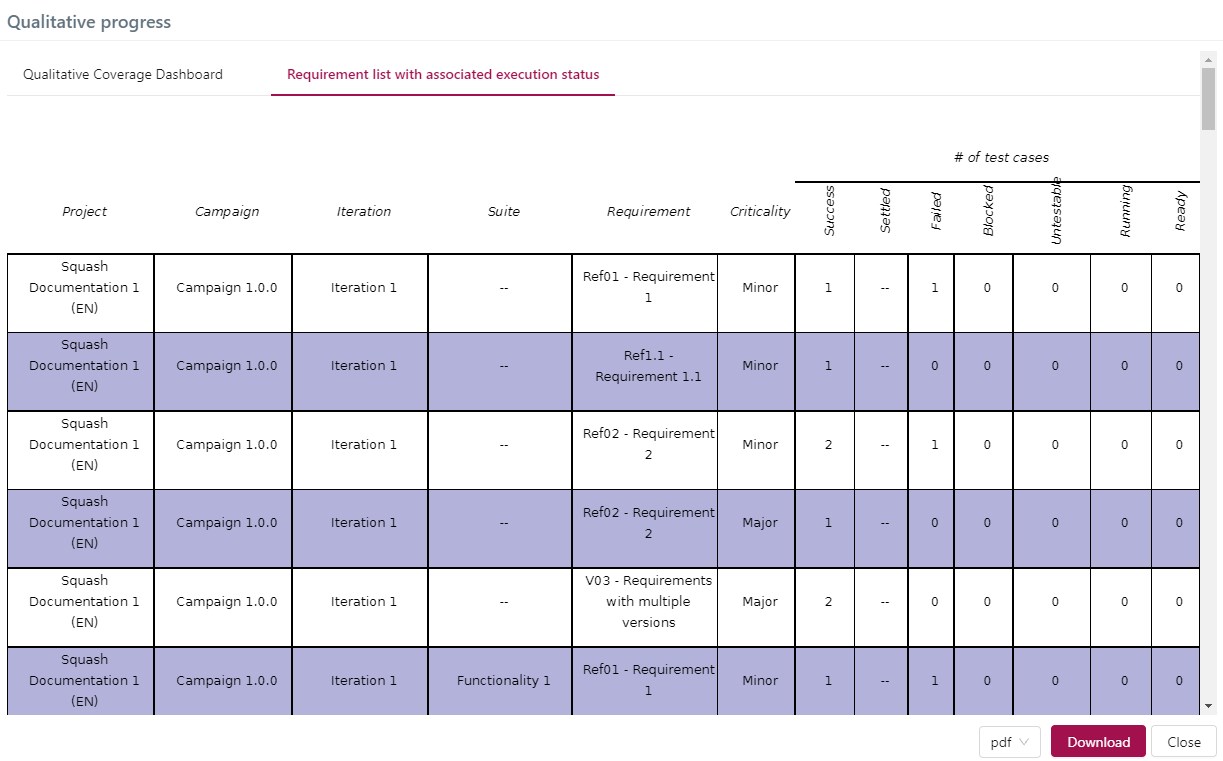
The Qualitative progress report enables you to get a quick overview of the requirements covered by the executed tests, and those that are not. You can generate this report from the perimeter of one or multiple projects.
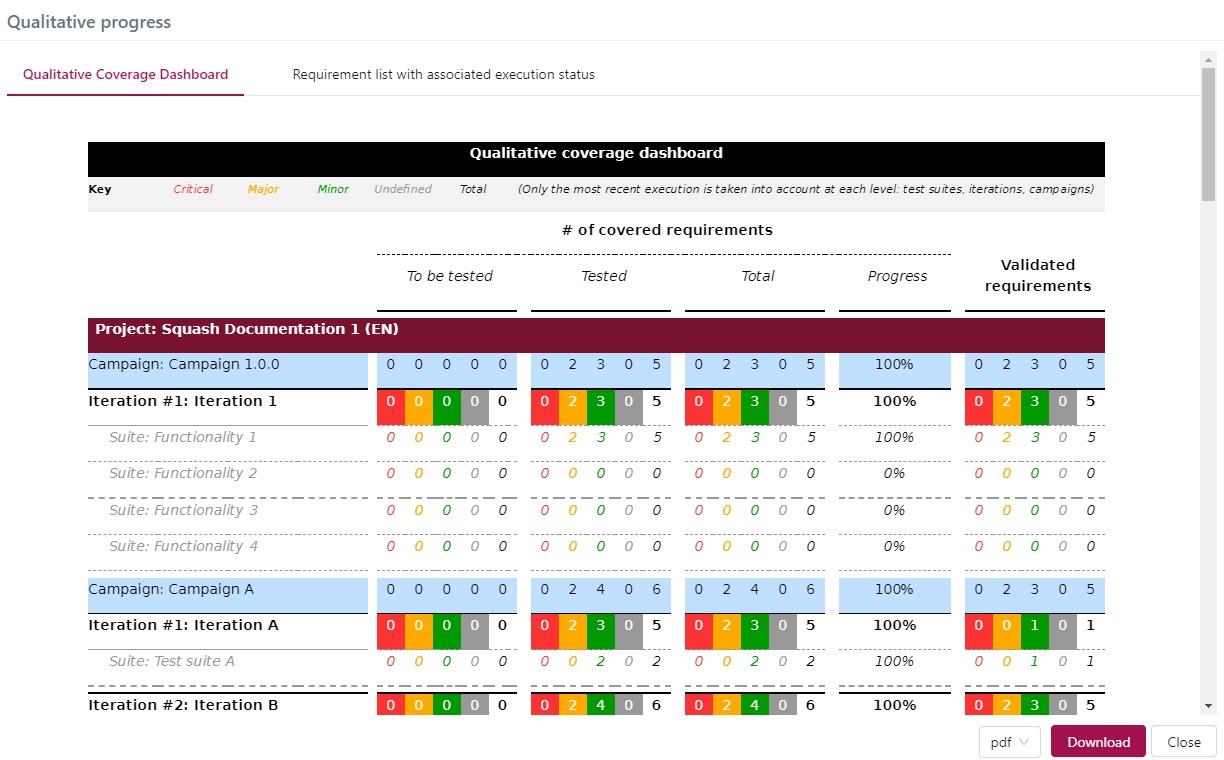
For this report, two tables are generated: The Qualitative Coverage Dashboard gives you the number of requirements that were tested and validated in the campaigns, iterations, and test suites the project contains.
The Requirements list with associated execution status is detailed, with the requirements and the execution status of their test cases by campaign, iteration, and test suite.
Campaign Report
Warning
This report is available with a SquashTM Premium or Ultimate license.
The Campaign Report enables you to generate an editable report with these campaign details: details of the requirements and tested test cases in the campaigns' iterations, requirements coverage rates, issue details with bugtrackers GitLab, Jira, Redmine, Azure, Mantis, and Bugzilla. It is generated in Word format to enable you to edit it.
It contains, for one or several campaigns and their iterations, the following information:
- the information of the selected campaigns;
- the iterations associated with them;
- the schedule (if filled in) of the campaigns and iterations;
- the number of test cases by execution status for the campaigns and for each iteration;
- the total number of test cases for the campaigns and for each iteration;
- the execution progress percentage of the campaigns and of each iteration;
- the functional coverage of the requirements according to their criticality for the campaigns;
- the functional coverage of the requirements according to their criticality for each iteration1;
- the number of campaign issues by criticality and status according to their type2;
- the list of all campaign issues by bugtracker2;
- the details of the requirements and test cases according to their criticality or importance for each iteration of the campaigns3.
Focus
- To retrieve the details of the issues, you must enter your login credentials for the bugtracker in the Bugtrackers workspace;
- In Word, the table of contents must be manually updated. For this, press F9;
- In the Campaign report, you must manually complete the text highlighted in yellow;
- This Campaign report is only useful if your campaigns have iterations.
Iteration Report
Warning
This report is available with a SquashTM Premium or Ultimate license.
Like the Campaign report, the Iteration report enables you to generate an editable report with these iteration details: details of the requirements and tested test cases in the iterations, requirements coverage rate, issue details with bugtrackers GitLab, Jira, Redmine, Azure, Mantis, and Bugzilla. It is also generated in Word format to enable you to edit it.
It contains, for one or several iterations and their test suites, the following information:
- the information of the selected iterations;
- the test suites associated with them;
- the schedule (if filled in) of the iterations;
- the number of test cases by execution status for the iterations and for each test suite;
- the total number of test cases for the iterations and for each test suite;
- the execution progress percentage of the iterations and of each test suite;
- the functional coverage of the requirements according to their criticality for the iterations;
- the functional coverage of the requirements according to their criticality for each test suite4;
- the number of iteration issues by criticality and status according to their type2;
- the list of all iteration issues by bugtracker2;
- the details of the requirements and test cases of the iterations according to their criticality or importance3.
Focus
- To retrieve the details of the issues, you must enter your login credentials for the bugtracker in the Bugtrackers workspace;
- In Word, the table of contents must be manually updated. For this, press F9;
- In the Iteration report, you must manually complete the text highlighted in yellow.
Customize editable report templates
For reports in editable format .docx, it is possible to select a template other than the one proposed by SquashTM. This template is used when the report is downloaded.
This applies to the following reports:
- Requirement Editable Report;
- Test Case Editable Report;
- Campaign Report;
- Iteration Report.
Template selection is made via the Template field in the Criteria block of the reports.
Learn more
To select a custom template, it must first be added by an administrator. For more information, see Report templates.
Generated when the checkbox Include requirement coverage rate by iteration is checked. ↩
Generated when the checkbox Include issue details is checked. ↩↩↩↩
Generated when the checkbox Include requirement and test case details is checked. ↩↩
Generated when the checkbox Include requirement coverage rate by suite is checked. ↩